
Create Variable Pay & Bonus Pay Head with Statutory Details in TallyPrime
If your organisation follows statutory compliance and has enabled the statutory feature, enter the relevant statutory details while creating pay heads for variable pay and bonus.
Create Pay Head for Bonus with Statutory Details
- Create Bonus pay head.
- Enter the Pay Head calculation details.
- Set / Alter Income Tax Details: Set the option to Yes.
- In the Income Tax Details screen, enter the following details:
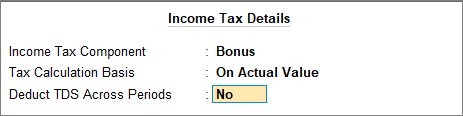
- Income Tax Component: Select Bonus from the List of Income Tax Components.
- Tax Calculation Basis: Select On Actual Value.
- Deduct TDS Across Periods: By default, it is set to No because tax is deducted in the same month as when the bonus is paid.
- Press Ctrl+A to save the pay head master.
Create Pay Head for Variable Pay with Statutory Details
- Create Variable Pay pay head.
- Enter the Pay Head calculation details.
- Set / Alter Income Tax Details: Set the option to Yes.
- In the Income Tax Details screen, enter the following details:
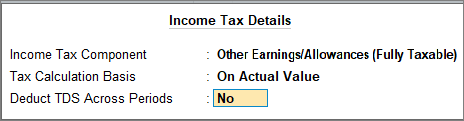
- Income Tax Component: Select Other Earnings/Allowances (Fully Taxable) from the List of Income Tax Components.
- Tax Calculation Basis: Select On Actual Value.
- Deduct TDS Across Periods: By default, it is set to No because tax is deducted in the same month as when the variable pay is paid.
- Press Ctrl+A to save the pay head master.
Once you have created the pay head, you can now include it in the payroll only for the month in which the variable pay and bonus are disbursed.
Is this information useful?
YesNo


