
Print ESI Form 6 in TallyPrime (Payroll)
ESI Form 6 records details of employees covered under ESI, including monthly information on days worked, wages earned, and the employee’s ESI contribution.
- Gateway of Tally > Display More Reports > Statutory Reports > Payroll Reports > Employee State Insurance > Form 6.
- Press C (Configure) for print configurations.
- Specify the Period in the respective From and To fields.
- Select the required Employee Category, Employee/Group, Sorting Method, and Display name for Employees, and press Enter.
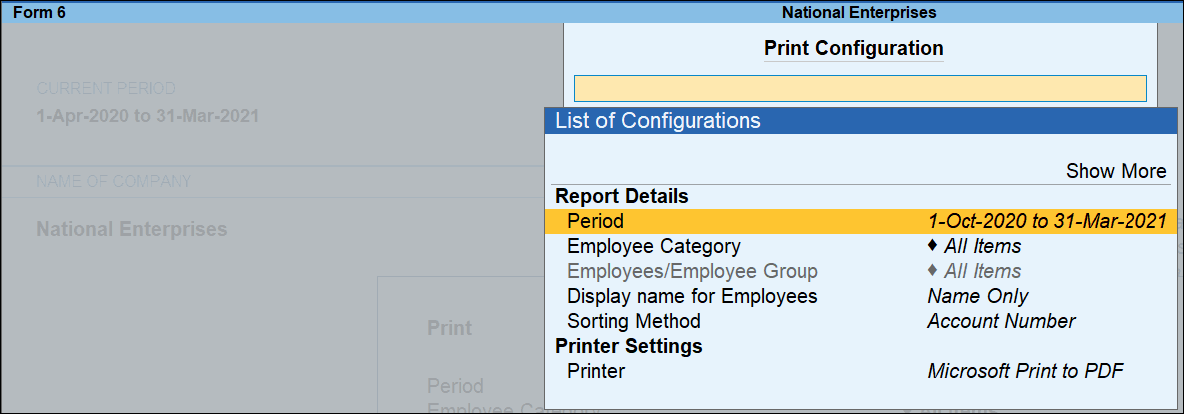
- Press I (Preview) or P (Print).
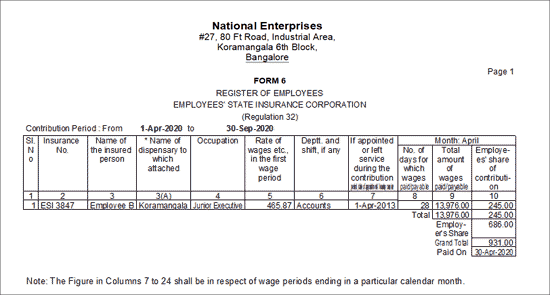
Column Details:
-
Insurance No.: Displays the ESI number assigned to each employee, as recorded in the Employee Master.
-
Name of the Insured Person: Displays the names of employees eligible for ESI.
-
Occupation: Displays the employee’s designation as specified in the Employee Master.
-
Rate of Wages etc., in the first wage period: Displays the per-day wage for the first month of the block period.
-
Deptt. and shift, if any: Displays the employee’s department as defined in the Employee Master; shift details, if any, must be entered manually.
-
If appointed or left service during the contribution period, date of appointment / leaving service: Displays the date of joining if the employee is currently employed, or the date of leaving if the employee has exited during the contribution period.
-
Father’s or Husband’s Name: Displays the father’s or husband’s name as specified in the Employee Master.
-
Insurance No. allotted by the corporation (to be entered at the branch office): Displays the unique ESI number assigned by ESIC, as recorded in the Employee Master.
-
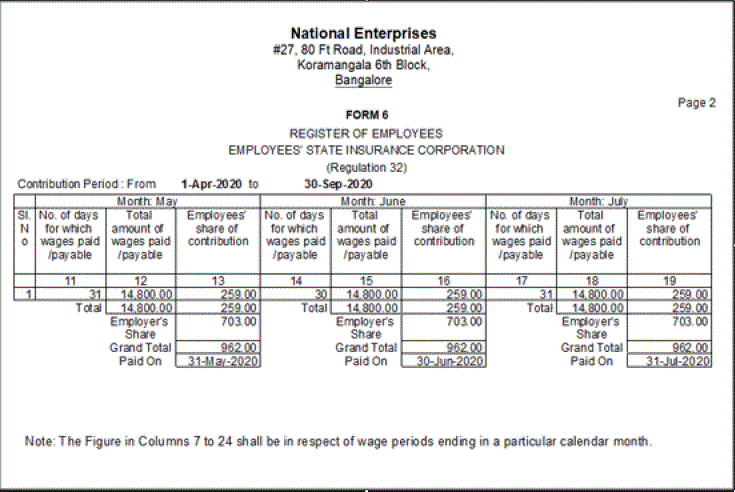
No. of days for which wages paid/payable: Displays the total number of days for which wages are paid or payable for each employee during the month.
-
Total amount of wages paid/payable: Displays the total wages paid or payable for each employee.
-
Employees’ share of contribution: Displays the employee’s share of ESI contribution for the month.
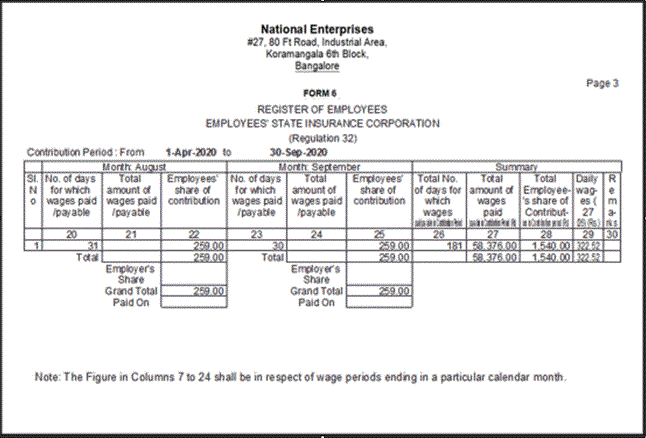
Column Details:
-
Total No. of days for which wages paid/payable in Contribution Period: Shows the total number of days for which wages are paid or payable during the selected contribution period for each employee.
-
Total amount of wages paid/payable in Contribution Period (Rs): Displays the total wages paid or payable during the six-month contribution period for each employee.
-
Total Employee’s share of Contribution in Contribution period (Rs): Displays the total employee contribution towards ESI for the selected contribution period.
-
Daily wages (27/26) (Rs.): Displays the calculated daily wages for each employee based on the contribution period.
-
Remarks: Enter any additional remarks, if required


