
Print ESI Form 5 in TallyPrime (Payroll)
ESI Form 5 is a half-yearly Return of Contribution that captures employee-wise ESI contributions made on a monthly basis. You can print only duplicate copies of ESI Form 3, Form 5, and the Challan.
- Gateway of Tally > Display More Reports > Statutory Reports > Payroll Reports > Employee State Insurance > Form 5.
- Press C (Configure) for print configurations.
- Specify the Period in the respective From and To fields.
- Select the required Employee Category, Employee/Group, Sorting Method, and Display name for Employees, and press Enter.
- Press I (Preview) or P (Print).
-
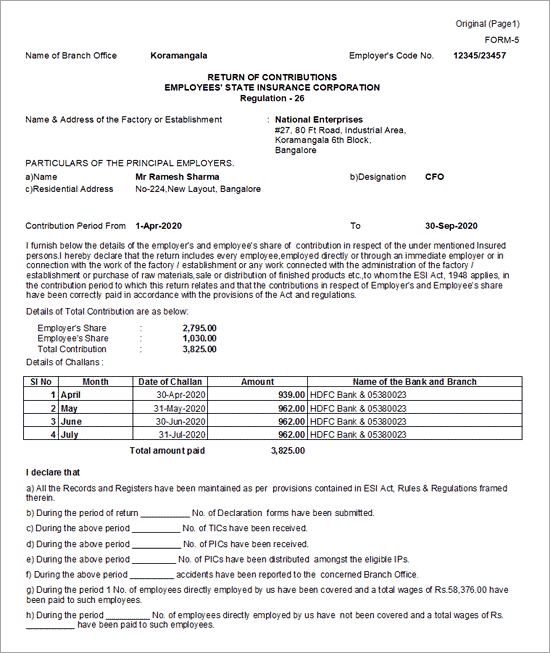
Name of Branch Office: Displays the ESI branch office of the company as specified in the F11 (Features) screen while enabling Payroll Statutory features.
-
Employer’s Code No.: Displays the employer’s ESI code as defined in the F11 (Features) screen during Payroll Statutory setup.
-
Name & Address of the Factory/Establishment: Displays the company’s name and address.
-
Employer’s Code: Displays the ESI code allotted to the employer, as specified in the F11: Statutory & Taxation screen while enabling ESI.
-
Particulars of Principal Employer: Prints the name, designation, and residential address as configured in the Print Configuration screen.
-
Contribution Period (From–To): Displays the period as specified in the Print Configuration screen.
-
Total ESI Contribution: Displays the total ESI amount along with the breakup of employer’s and employees’ contributions, based on system calculations.
Column Details:
-
Month: Displays the month for which the ESI payment is made.
-
Challan Dates: Displays the dates of the ESI payment challans.
-
Amount: Displays the challan amount for ESI payments.
-
Name of the Bank and Branch: Displays the bank name and branch code as specified in the Challan Details screen.
Column Details:
-
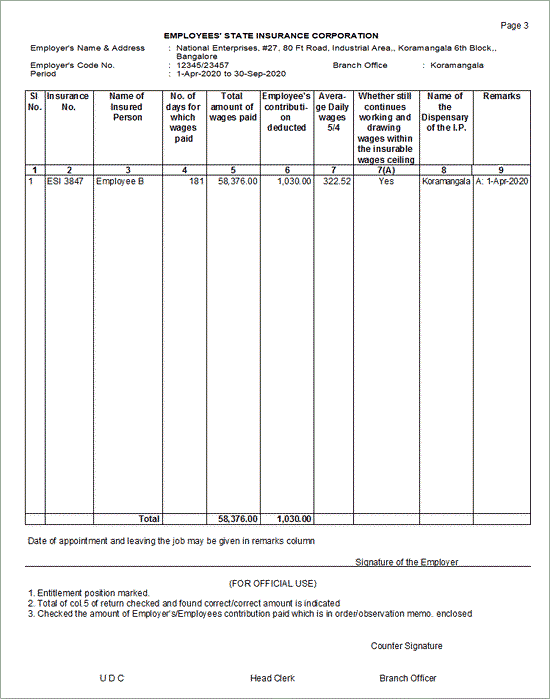
Insurance No.: Displays the ESI number of each employee as recorded in the Employee Master.
-
Name of the Insured Person: Displays the names of employees eligible for ESI.
-
No. of days for which wages paid/payable: Displays the total number of days for which wages are paid or payable during the contribution period for each employee.
-
Total amount of wages paid/payable: Displays the total wages paid or payable during the contribution period for each employee.
-
Employees’ contribution deducted: Displays the employee’s share of ESI contribution for the contribution period.
-
Average Daily wages 5/4: Displays the average daily wages calculated for the selected contribution period.
-
Whether still continue working and drawing wages within the insurable wages ceiling: Displays Yes/No, indicating whether the employee continues to work and remains eligible for ESI based on wages earned in the last month of the contribution period.
-
Name of the Dispensary of IP.: Displays the ESI dispensary name associated with each employee, as specified in the Employee Master.
-
Remarks: Enter any additional remarks, if required.


