
View Sales Orders Book in TallyPrime
The Sales Orders Book provides a summary of the Sales Orders recorded in TallyPrime. You can view order details for different periods, compare Sales Orders, and analyse estimated profitability.
- Press Alt+G (Go To) > type or select Sales Orders Book.
The report displays a monthly summary of the Sales Orders recorded or cancelled. - Select the required month and press Enter to view the Sales Orders recorded for the month.
- Compare Sales Orders to track the pending and completed sales orders.
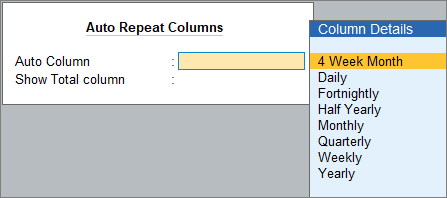
- Press Alt+N (Auto Column).
- In the Auto Repeat Column screen, select Monthly as Auto Column and enable Show Total Column.
The report shows the total number of vouchers recorded month-wise.
- To view estimated profits/losses from the sales order book, press F7 (Show/Hide Profit).
Is this information useful?
YesNo


