
Set Up Receivables & Payables Tracking
Configure outstanding tracking in TallyPrime using the required options and party master settings. Enable bill-wise tracking, define credit limits and credit periods, and calculate interest on outstanding amounts based on your business requirements.

Ensure that:
- Customer and supplier ledgers have been created.
- Credit terms, such as credit limits and credit periods, have been determined, if applicable.
- Interest calculation requirements, if applicable, have been finalised.
Enable Features for Receivables & Payables Tracking | F11 (Features)
Configure the features required to track outstanding amounts and manage credit terms.
Enable Bill-wise Tracking
Set up bill-wise tracking to manage receivables and payables invoice-wise, and settle them against individual invoices or bills.
To understand bill-wise and on-account tracking, refer to Flexible Tracking of Receipts, Payments, and Outstanding Amounts.
- Go to Gateway of Tally > press F11 (Features).
- Ensure that Maintain Accounts is set to Yes.
- Verify that Enable Bill-wise entry is set to Yes.
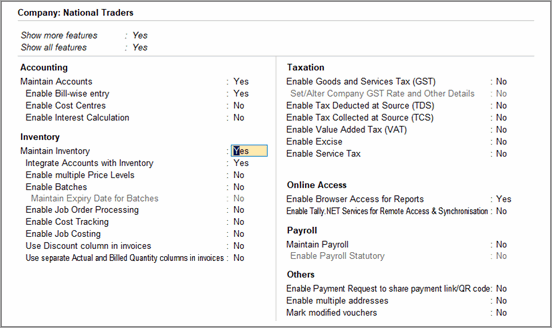
- Press Ctrl+A to save the changes.
Bill-wise tracking is now enabled. Configure party ledgers to track and settle receivables and payables against individual invoices or bills.
Enable Interest Calculation
Enable interest calculation if your business charges or pays interest on overdue amounts.
- Go to Gateway of Tally > F11 (Features).
- Set Enable Interest Calculation to Yes.
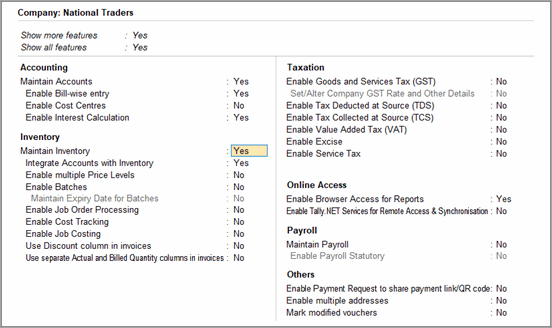
- Press Ctrl+A to save the changes.
You can now configure interest rates to calculate interest on overdue receivables and payables.
Set Up Credit Limit for Parties
Configure credit limits for customers to control the maximum outstanding amount allowed for each party.
In the customer or supplier ledger:
- In Specify Credit Limit enter the limit for the party, if required.
This is available in the ledger only when Provide Credit Limits is set to Yes in F12 (Configurations).- Enable Override credit limit using post-dated transactions, if required.
This allows you to manage credit limit by recording post-dated receipt vouchers.
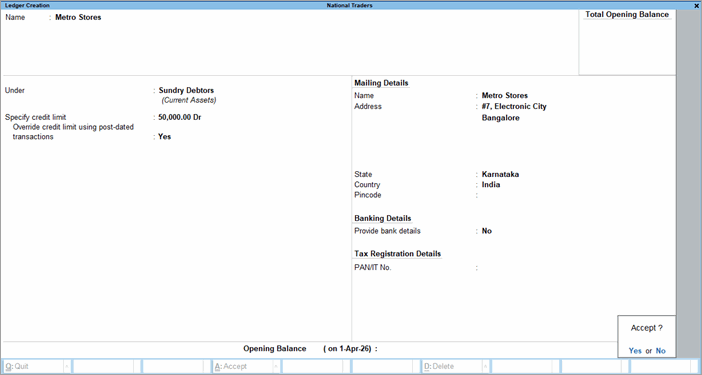
- Enable Override credit limit using post-dated transactions, if required.
- Press Ctrl+A to save the ledger.
You can now define credit limits for individual customers to manage customer credit exposure.
Set Up Interest Calculation for Parties
Configure interest calculation settings for customers or suppliers.
In the customer or supplier ledger:
- Set Activate interest calculation to Yes, if required.
This is available in the ledger only when Enable Interest Calculation is set to Yes in F11 (Features) and Provide Interest Calculation Parameters for Ledger Balances is set to Yes in F12 (Configurations).
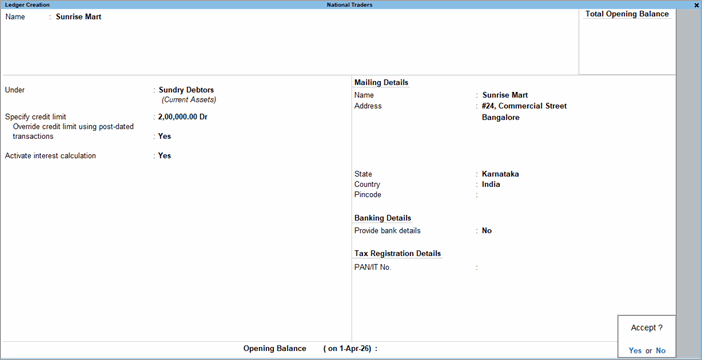
- Press Ctrl+A to save the ledger.
You can now calculate interest on overdue balances for the selected customer or supplier using the defined interest settings.
Set Up Invoice-wise Tracking and Credit Periods
Configure these settings to track invoices and bills individually.
For details about bill-wise and on-account tracking, refer to Flexible Tracking of Receipts, Payments, and Outstanding Amounts.
In the customer or supplier ledger:
- Set Maintain balances bill-by-bill to Yes.
This is available in the ledger only when Enable Bill-wise Entry is set to Yes in F11 (Features) and Maintain balances Bill-by-Bill is set to Yes in F12 (Configurations). - Enter the Default Credit Period.
By default, the credit period is specified in days. You can also use w, m, or y to indicate weeks, months, or years. - Enable Check for credit days during voucher entry, if required.
This helps you identify if there is any outstanding for the customer or supplier when creating a new voucher.
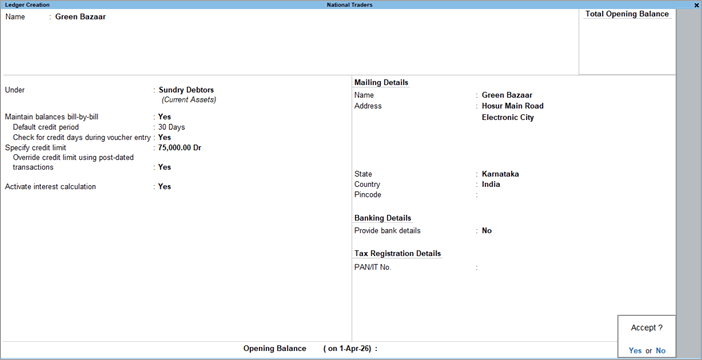
- Press Ctrl+A to save the ledger.
You can now track receivables and payables invoice-wise, apply credit periods to transactions, settle receipts and payments bill-wise, and analyse outstanding amounts by ageing and overdue status.
Review and Update Party Credit Terms
Review and update credit limits and credit periods whenever customer agreements, supplier agreements, or business requirements change.
In the customer or supplier ledger:
- Review the existing credit period and credit limit.
- Update the values, as required.
- Save the changes in the ledger.
The updated credit limits and credit periods will apply to future transactions for the party.
Questions & Answers
- When should I enable bill-wise tracking?
Enable bill-wise tracking when you want to track and settle outstanding amounts against individual invoices or bills. This is useful when customers or suppliers have multiple invoices with different due dates.
For details about bill-wise and on-account tracking, refer to Flexible Tracking of Receipts, Payments, and Outstanding Amounts. - Can I define a credit period without bill-wise entry?
No. Credit periods are available only when bill-wise tracking is enabled and outstanding amounts are tracked against individual invoices or bills. - Can I set a credit limit without bill-wise tracking?
Yes. Credit limits can be defined even when only the overall outstanding balance of a customer or supplier is tracked. - Do I Need to Enable Interest Calculation for All Parties?
No. After enabling Interest Calculation in F11, you can choose whether to activate interest calculation for individual parties.


