
Use Try Now Tile in TallyPrime – Explore New Features, Tips, and Other Ways to Boost Your Experience
Getting the most value from TallyPrime depends on making effective use of the features that benefit your business.
The Try Now tile and Try Now reports help you discover features, enhancements, and capabilities available in TallyPrime that you may not have explored yet, making it easier to understand their value and use them in your day-to-day business

- Ensure that you have a valid TallyPrime license.
- TallyPrime Release 7.2.
- The Try Now tile is shown based on your serial number, product version, and other information collected in accordance with the Terms of Use.
Enable or Disable the Try Now tile
- Press F1 (Help) > Settings > select Display.
- Show the Try Now tile on Gateway of Tally: Yes or No, as applicable.
By default, the Try Now tile displays messages on the Gateway of Tally. You can disable or enable it at any time using the same option.
Even if you disable it, you can still view the messages in the Try Now report.
Use Try Now tile
You can find the Try Now tile on Gateway of Tally at the bottom-left corner.
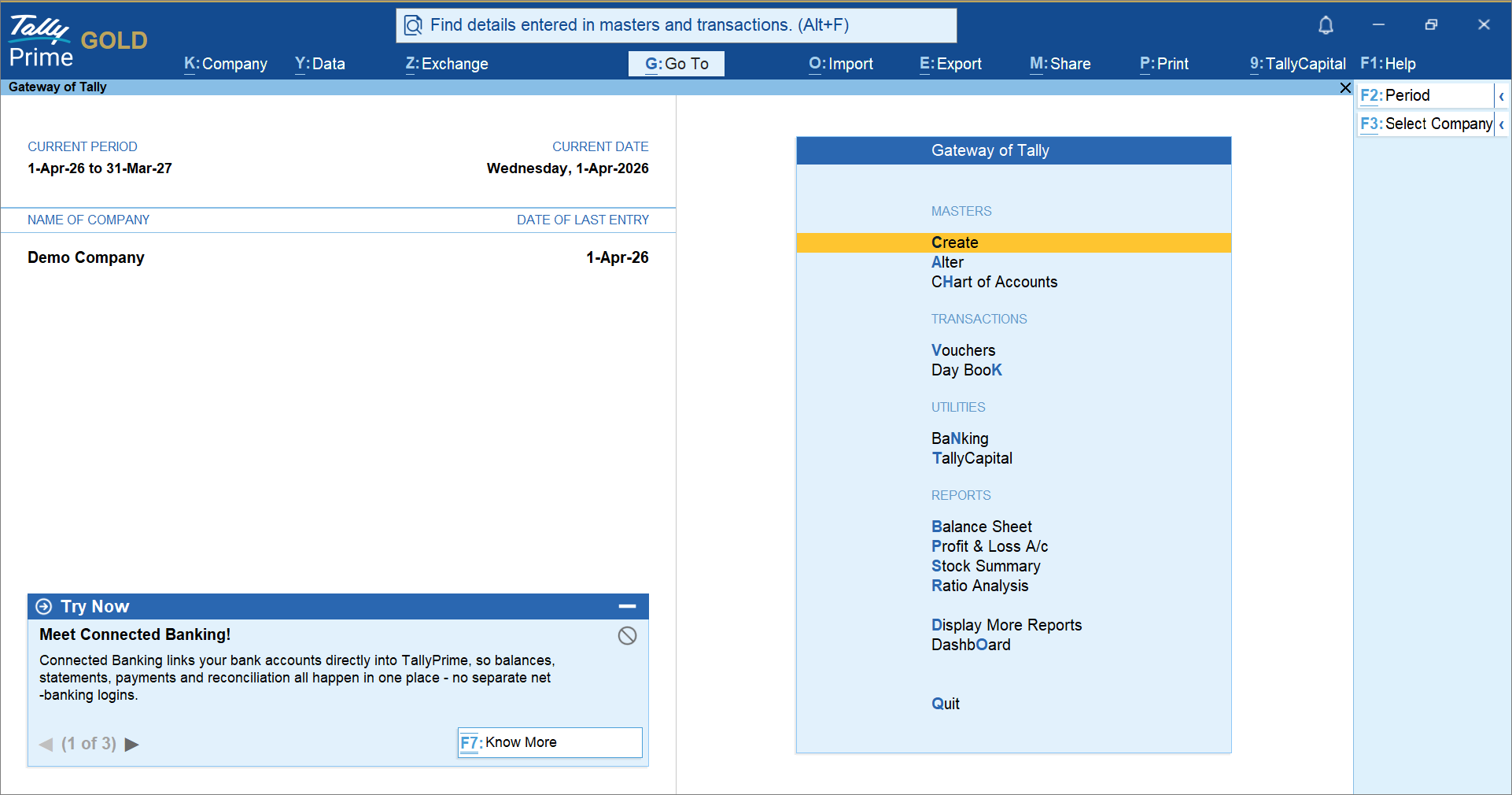
The body of the tile contains the messages, and the bottom-left corner displays the total number of messages.
Collapse messages
- Click the minimise button to minimise the messages.
The tile gets minimised, and you will see only the header of the tile. It remains minimised until you close TallyPrime. When you open TallyPrime again, you can see the Try Now tile again.
View more messages
- Press Right Arrow for the next message.
- Press Left Arrow for the previous message.
Hide messages
- Click the hide button to hide the message.
Once dismissed, the message will no longer appear in the Try Now tile on the Gateway of Tally.
However, you can still view it in the Try Now report.
After dismissing the message once, you can make it reappear on the Gateway of Tally by enabling it from Settings.
Know more about the functionality/feature/tips
Ctrl+Alt+F7 (Know More): Learn more about the feature and its functionality on TallyHelp.
View All Try Now Messages
The Try Now report brings together all messages relevant to your serial number, including those dismissed from the Gateway of Tally. It provides an overview of available features and ways to enhance your TallyPrime experience.
This gives you a broader overview about different ways to enhance your TallyPrime experience.
- Press F1 (Help) > Try Now.
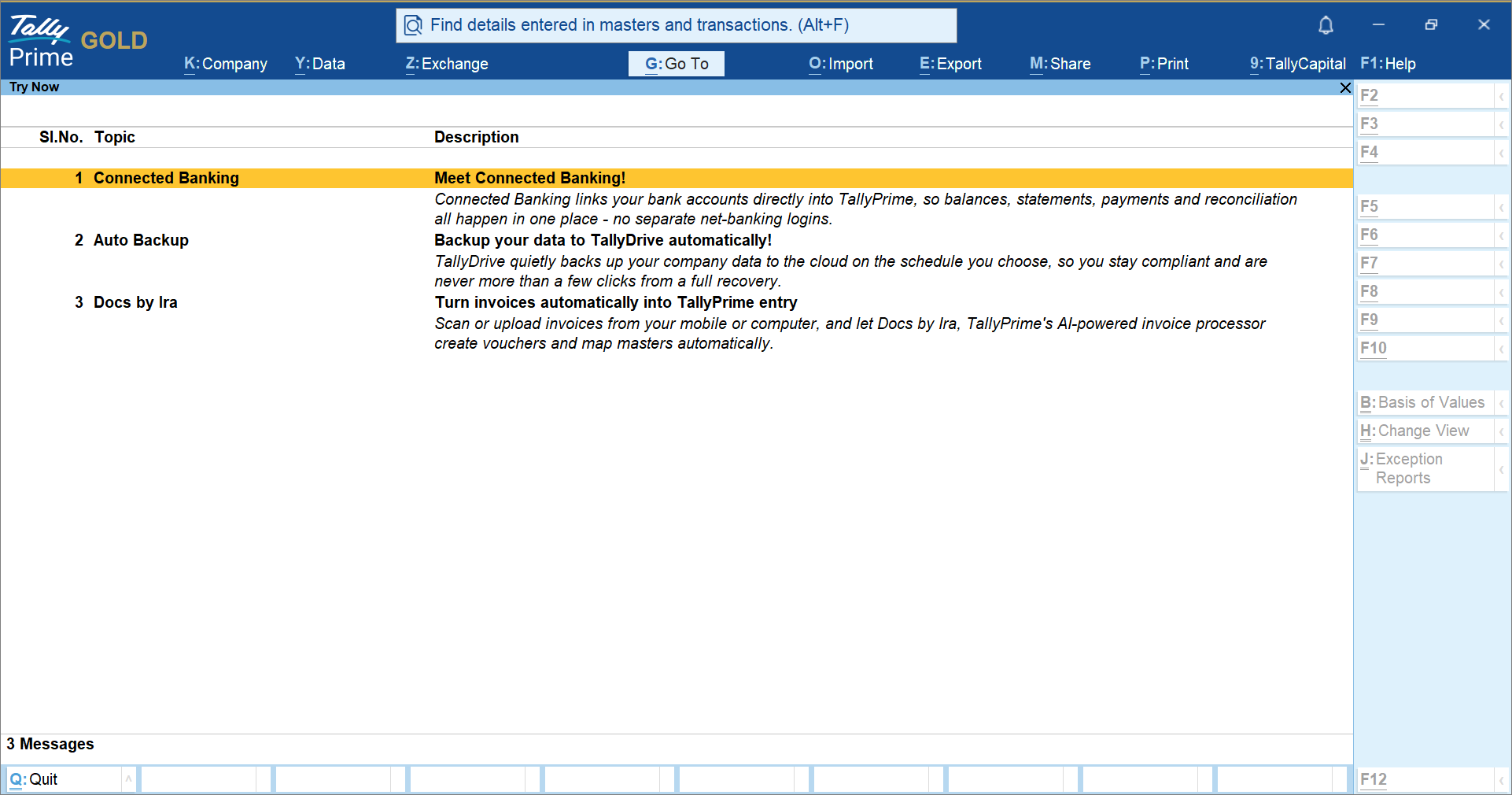
- To learn more, press Enter on a message to open the related topic on TallyHelp.
Questions & Answers
- I have enabled the Try Now tile, but I do not see any messages on the Gateway of Tally. Why?
Messages in the Try Now tile are displayed based on your serial number, product version, and other information collected in accordance with the Terms of Use. If no messages appear, it means there are currently no relevant messages available for your serial number and version.
- I do not want to see The Try Now tile on the Gateway of Tally. How do I turn them off?
Press F1 (Help) > Settings > Display and disable the Try Now option.
You can enable it again at any time.
- I dismissed the Try Now tile on the Gateway of Tally. How can I view it again?
Open the Try Now report. Press F1 (Help) > Try Now.
You can view all active messages available for your product.
Alternatively, you can enable the setting to view messages on Gateway of Tally.
- Why am I seeing the Try Now tile that do not seem to be relevant to my business?
The Try Now tile displays features that you have not used yet. You can click the Know More button and learn about the feature and know the best way you can use the feature for your business. Moreover, Try Now messages are displayed based on your serial number, product release, and other applicable information collected in accordance with the Terms of Use. These messages highlight features available in TallyPrime, helping you discover functionality that is available to you, even though some features may be more relevant to certain business needs than others.
- I saw the Try Now tile in one release, but not in another. Is the tile version-dependent?
If your release supports the Try Now tile, messages are displayed whenever relevant content is available for your serial number.
If there are no messages, the Try Now tile does not appear on the Gateway of TallyPrime.


