
Create Salary Payable Ledger in TallyPrime
The Salary Payable ledger is used to record the salary amount due to employees as a liability until it is paid, ensuring proper tracking between salary expense and payment.
- Press Alt+G (Go To) > Create Master > Pay Head and press Enter.
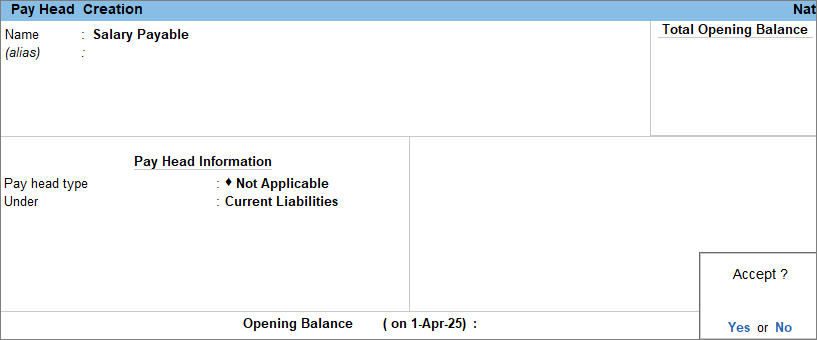
- Enter the Pay Head details.
- Name: Enter the name of the payable ledger, for example, salary payable.
- Pay head type: Select Not Applicable.
- Under: Select Current Liabilities from the List of Groups.
- Press Ctrl+A to save the pay head master.
Once the Salary Payable ledger is created, you can use it to record salary accruals.
Is this information useful?
YesNo


