
Create PF, ESI, NPS, PF Admin Expenses Payable Ledgers in TallyPrime
To process Salary in TallyPrime, you can create payable ledgers for PF, ESI, NPS and PF admin.
PF Payable Ledger
- Press Alt+G (Go To) > Create Master > Pay Head > and press Enter.
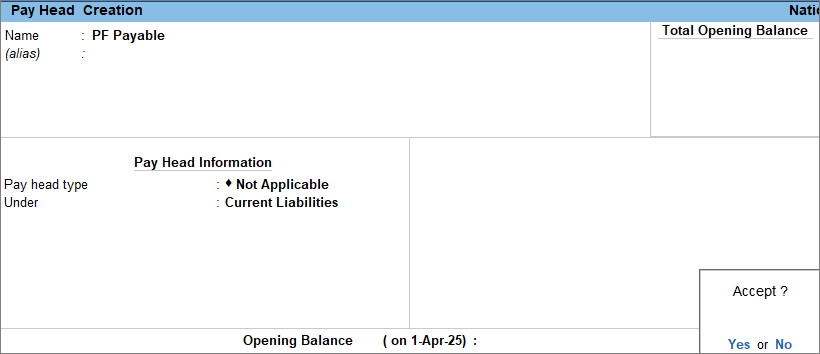
- Enter the Pay Head details.
- Name: Enter the name of the payable ledger, for example, PF payable.
- Pay head type: Select Not Applicable.
- Under: Select Current Liabilities from the List of Groups.
- Press Ctrl+A to save the pay head master.
Similarly, create ESI Payable Ledger and NPS Payable Ledger.
PF Admin Expenses
- Press Alt+G (Go To) > Create Master > Ledger > and press Enter.
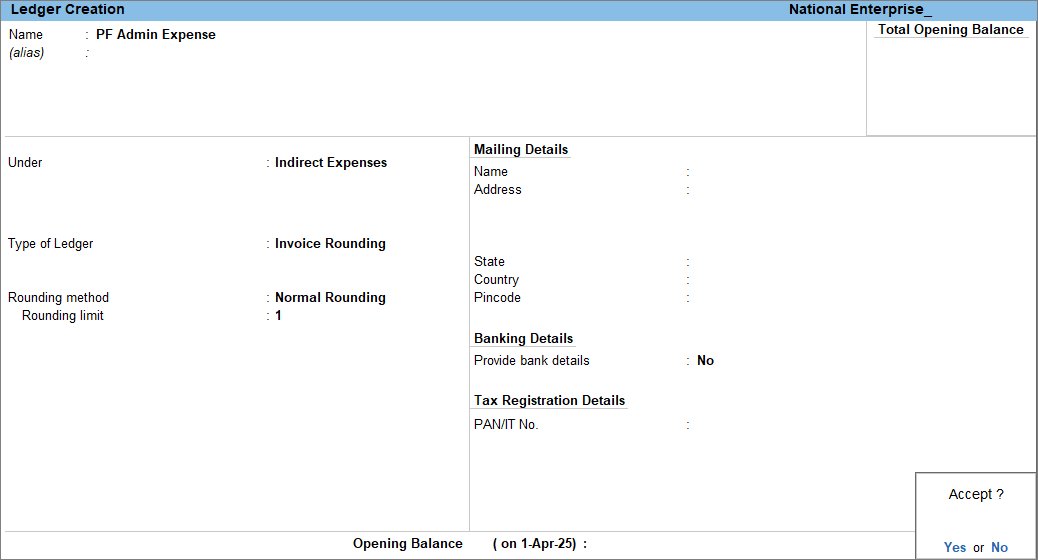
- Enter the Ledger details.
- Name: Enter the name of the ledger.
- Under: Select Indirect Expenses from the List of Groups.
- Type of Ledger: Select Invoice Rounding from the list of Types of Ledger.
- Rounding method: Select Normal Rounding from the List of Rounding Methods. To know more, click here.
- Rounding limit: Set it as 1.
- Press Ctrl+A to save the ledger.
Is this information useful?
YesNo


