
Create Deduction Pay Heads in TallyPrime
In TallyPrime, you can create a Canteen Deduction pay head to recover subsidised canteen expenses from employees, and a Salary Advance Deduction pay head to recover advances given against salary.
Create Pay Head for Salary Advance Deduction
- Press Alt+G (Go To) > Create Master > Pay Head and press Enter.
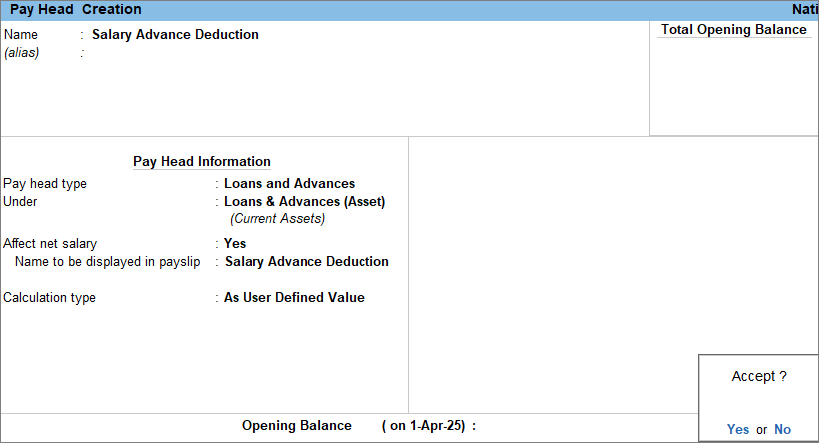
- Enter the Pay Head details.
- Name: Enter the name of the pay head as Salary Advance Deduction.
- Pay head type: Select Loans and Advances from the List of Pay Head Types.
- Under: Select Loans & Advances (Asset) from the List of Groups.
- Affect net salary: Set the option to Yes.
Enabling this option determines whether the pay head affects the employee’s final take-home salary. - Name to be displayed in payslip: Enter the pay head name to display on the payslip. By default, the system displays the name you create for the pay head.
- Calculation type: Select As User Defined Value from the List of Calculations.
- Press Ctrl+A to save the pay head master.
Create Pay Head for Canteen Deduction
- Press Alt+G (Go To) > Create Master > Pay Head and press Enter.
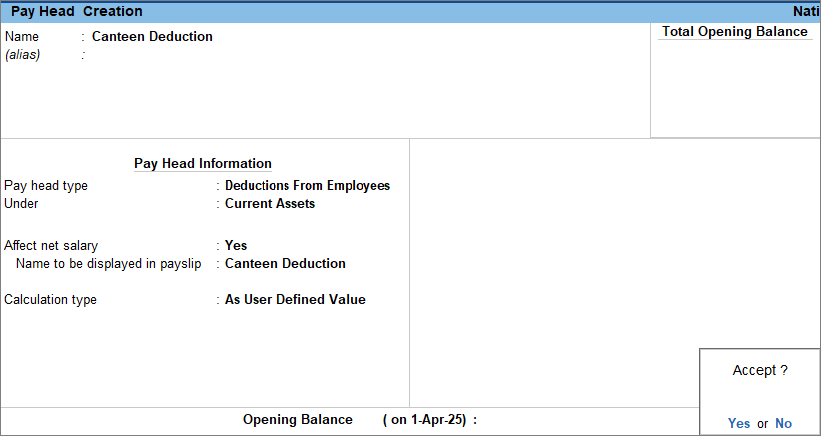
- Enter the Pay Head details.
- Name: Enter the name of the pay head as Canteen Deduction.
- Pay head type: Select Deductions from Employees from the List of Pay Head Types.
- Under: Select Current Assets from the List of Groups.
- Affect net salary: Set the option to Yes.
Enabling this option determines whether the pay head affects the employee’s final take-home salary. - Name to be displayed in payslip: Enter the pay head name to display on the payslip. By default, the system displays the name you create for the pay head.
- Calculation type: Select As User Defined Value from the List of Calculations.
- Press Ctrl+A to save the pay head master.
Is this information useful?
YesNo


