
Recharge Your Interakt Wallet
Once you have signed up with WhatsApp, all the business conversations with your parties are based on the pricing policy of Interakt. Therefore, you will need to recharge your Interakt wallet when there is low wallet balance. You can recharge the wallet through your Tally Partner or do it yourself directly from TallyPrime or by logging in to the Customer Portal.
- In TallyPrime, press Alt+M (Share) > Manage > Recharge Wallet.
The ONLINEBUY screen appears, displaying the Billing Details and the Order Summary for TallyPrime with WhatsApp – Top Up.
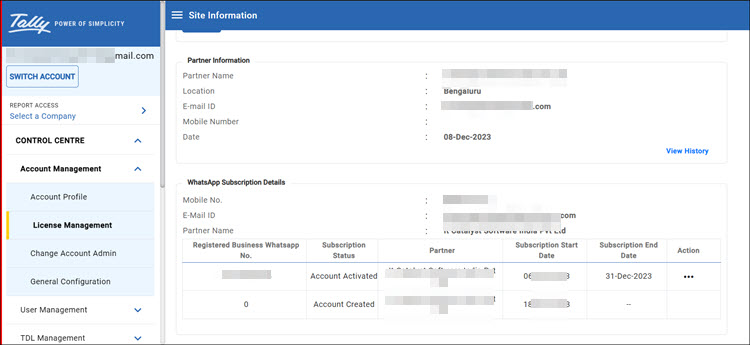
Alternatively, you can open the ONLINEBUY screen, from the customer portal, as well.- Log in to Customer Portal, and under Control Centre > Account Management > License Management, select the Serial Number.
- In the Site information page, under the WhatsApp Subscription Details section, click (…) under Actions, and select Recharge Wallet.
- In the Renew WhatsApp Subscription/Recharge Wallet screen, under Recharge Wallet, select Online, and click Proceed to Checkout to open the ONLINEBUY screen.
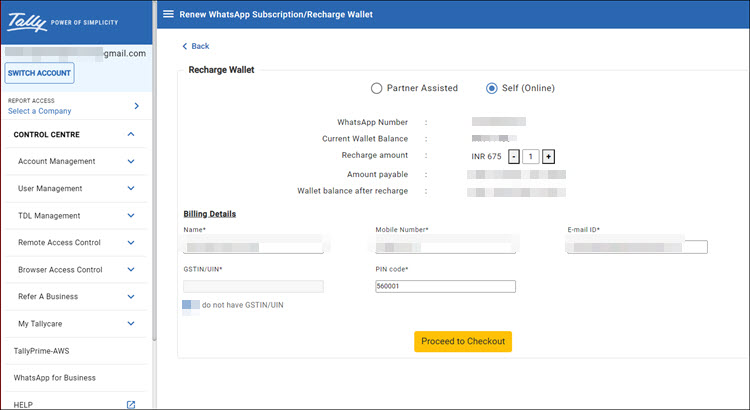
If you wish to get the renewal done by your Tally Partner, select Partner Assisted. The Partner will receive a notification and take it forward.
- Verify and update the details, as needed, select I agree with the Delivery policy, Cancellation policy, Refund policy and the Privacy policy, and click Proceed to Payment.
- Select your preferred payment mode, and complete the payment.
Once you have recharged the wallet, you can see the updated wallet balance from either of the following:
- Interakt account > click the Wallet icon in the left navigation pane.
- Customer Portal > Control Centre > Site Information > WhatsApp Subscription Details > Action > Wallet Balance.
Is this information useful?
YesNo


