
View Previous Employer Details in TallyPrime
To accurately compute income tax and generate Form 16 for employees who joined during the financial year, it is necessary to include the income earned from their previous employer along with the taxes already paid on that income.

- Ensure you have enabled Payroll in TallyPrime.
- Employee master is created.
- Income details from the previous employer are available.
- Tax deducted or paid by the previous employer is available.
Update Previous Employer Income/Exemption Details
- Press Alt+G (Go To) > Alter Master > Previous Employer Income/Exemption Details and press Enter.
- Select the employee from the List of Employees.
- Select the required Income Tax Component in the Particulars of Previous Employer Income/Exemption field.
- Enter the following details:
- Start date in the Effective From field.
- Value in the Income Amount field.
- Value in the Exemption Amount field.
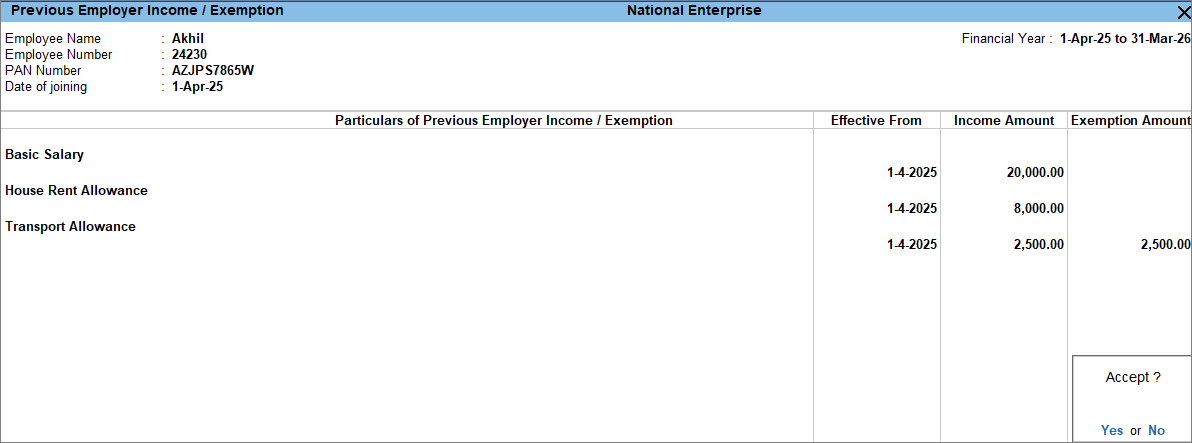
- Press Ctrl+A to save.
Update Previous Employer Tax Deducted/Paid Details
- Press Alt+G(Go To) > Alter Master > Previous Employer Tax Deducted/Paid Details and press Enter.
- Select the employee from the List of Employees.
- Enter the details of the previous employer along with the tax paid by them.
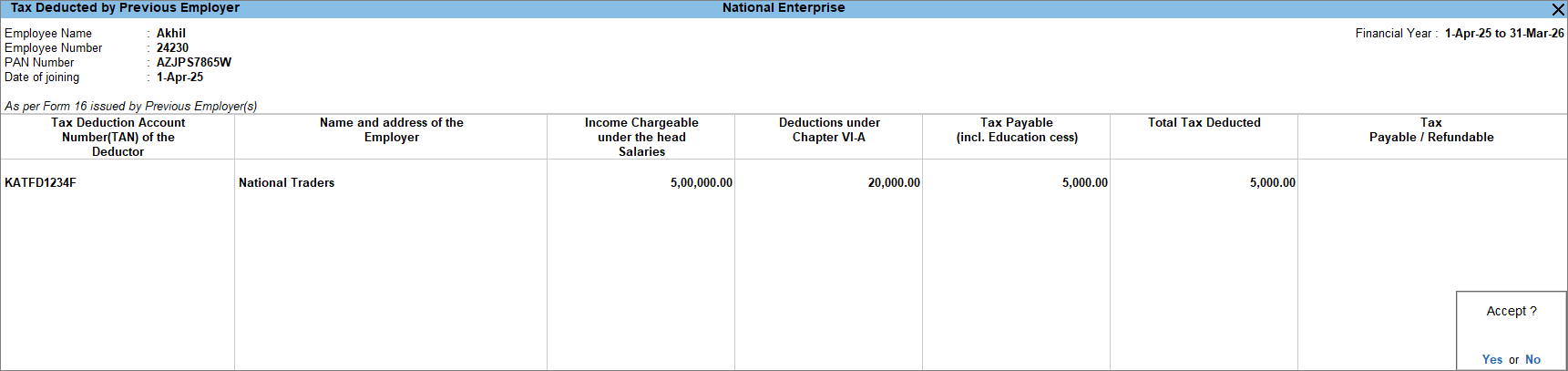
- Press Ctrl+A to save.
Is this information useful?
YesNo


