
Unable to proceed, as the backup does not exist or you are not authorised to restore backup from TallyDrive.
Cause: This error appears in any of the following cases:
- The Tally.NET user logged in for restore, no longer has the required rights to restore data.
- The user has been deleted or made inactive under the license.
Resolution:
As a standard user, you can request your License Administrator to grant you the required restore permissions on TallyDrive.
As an admin, you can add or re-activate the Tally.NET ID and assign restore rights from the Customer Portal or the TallyDrive Management report in TallyPrime.
- Open the TallyDrive Management report.
- Press F7 (Manage User Rights) .
- Select the Tally.NET ID for which you want to give the required rights.
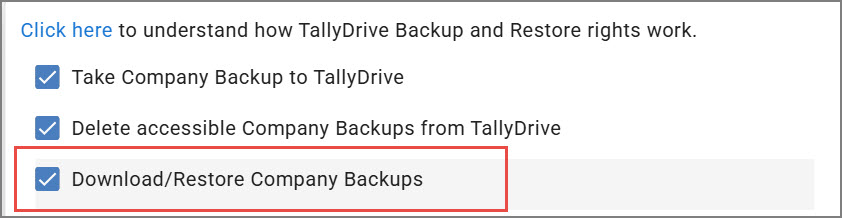
- Under Permissions for TallyDrive Backup and Restore, enable the option Download/Restore Company Backups.
To learn more about managing TallyDrive user rights, refer to How to Approve User Access and Manage User Rights to TallyDrive
Is this information useful?
YesNo


