
Interstate Consignment Transfer Outward in TallyPrime (VAT)
You can create vouchers for the stock transferred as consignment sales outside the state by selecting the nature of transaction Interstate Consignment Transfer Outward.
This nature of transaction is provided for Andhra Pradesh, Assam, Bihar, Chandigarh, Chhattisgarh, Delhi, Goa, Gujarat, Haryana, Himachal Pradesh, Jharkhand, Jammu & Kashmir, Karnataka, Kerala, Ladakh, Madhya Pradesh, Maharashtra, Odisha, Puducherry, Punjab, Rajasthan, Tamil Nadu, Telangana, Uttarakhand, Uttar Pradesh, and West Bengal.
- Gateway of Tally > Vouchers > press F8 (Sales).
Alternatively, press Alt+G (Go To) > Create Voucher > press F8 (Sales). - Select the party ledger in the field Party A/c name.
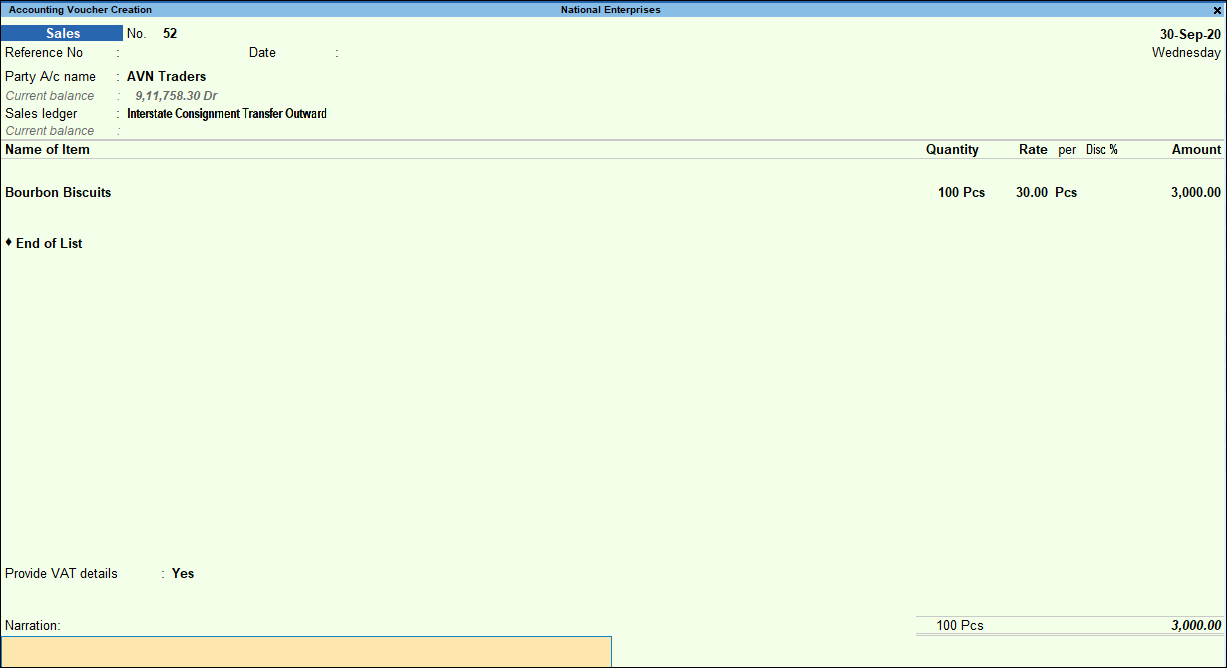
- Select the sales ledger grouped under Sales Accounts with Nature of transaction set to Interstate Consignment Transfer Outward.
As in other transactions, you can create the ledger on the fly by pressing Alt+C. Alternatively, press Alt+G (Go To) > Create Master > type or select Ledger > and press Enter. - Select the stock item. Enter the Quantity and Rate.
- Set the option Provide VAT details to Yes. In the Statutory Details screen,
- Select the Form to receive as shown below:

- Enter the Form serial no., Form no. and Date.
- Press Enter to save. The sales invoice appears as shown below:
- Select the Form to receive as shown below:
- Accept the screen. As always, you can press Ctrl+A to save.
Is this information useful?
YesNo


