
Find Text in a TDL File
The Find feature helps you quickly locate a specific text within a TDL file.
To search for text
- Go to Search > Find.
The Find Text dialog box appears as shown below:
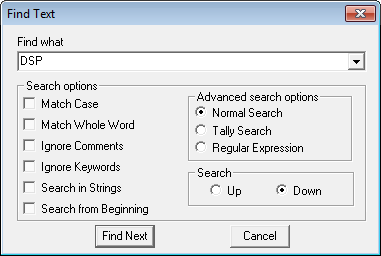
- Specify the text to find in the Find what box.
- Specify the Search options and the Advanced search options as per the requirement.
- Click Find Next from the search menu or press F3 to find the next result for the current search.
- Click Find Prev from the search menu or press Shift+F3 to find the previous result for the current search.
Is this information useful?
YesNo


