
Building a Secure WebSocket Bridge for TallyPrime Integrations
Introduction
Integrating external applications commonly involves HTTP-based communication using JSON or XML. This approach is well suited for environments where TallyPrime is accessible over a local machine, a local area network (LAN), a static IP address, or a managed cloud deployment. In these scenarios, applications can establish direct connectivity with TallyPrime and exchange business data with minimal networking complexity.
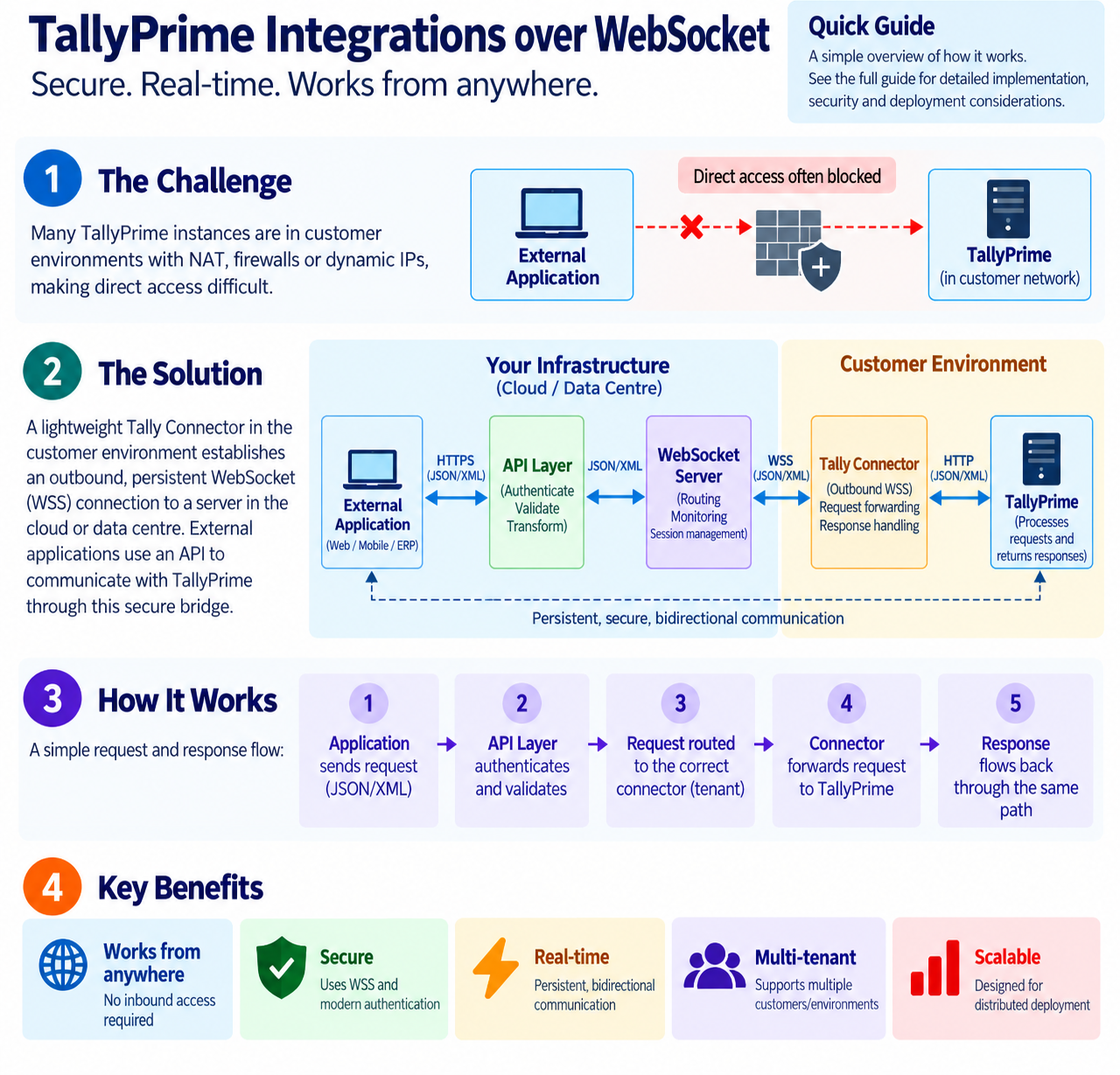
However, deployment environments can introduce additional connectivity challenges. Many TallyPrime instances are hosted within customer-managed networks, protected by Network Address Translation (NAT), corporate firewalls, or dynamic public IP addresses. In such environments, establishing direct inbound connectivity becomes increasingly difficult, making integrations more complex to deploy, maintain, and scale.
To address these challenges, this guide presents a WebSocket-based reference architecture that can enable persistent, bidirectional communication between external applications and TallyPrime without requiring direct inbound access to the customer environment. Rather than replacing existing integration capabilities, this pattern introduces an additional communication layer that solution providers can design for distributed and dynamic network environments.
This guide covers the architecture, communication flow, reliability considerations, security controls, and implementation choices involved in building a WebSocket-based integration with TallyPrime. It is an illustrative pattern, not infrastructure provided or mandated by Tally. The image below is a pictorial view of what a connection looks like.
Integration Deployment Models
How an application communicates with TallyPrime depends largely on the environment in which TallyPrime is deployed. While the integration capabilities remain consistent, the deployment environment determines how the application can reach TallyPrime and what network considerations need to be addressed.
The following deployment models illustrate how connectivity requirements evolve from a local setup to distributed customer environments.
|
Deployment Model |
How TallyPrime is Accessed |
Connectivity Characteristics |
Key Challenges |
|
Local System |
TallyPrime and the application run on the same machine. Communication takes place through the local loopback interface. |
✓ Simplest deployment model |
|
|
LAN Environment |
TallyPrime is hosted on a system within the same local network as the application. |
✓ Accessible within the LAN ✓ Common in office and enterprise environments ✗ Limited to users connected to the network |
|
|
Static IP Environment |
TallyPrime is accessible through a publicly routable IP address, allowing applications to connect remotely. |
✓ Supports direct remote connectivity ✓ Accessible over the internet ⚠ Requires firewall and network configuration ⚠ Requires appropriate security controls |
|
|
TallyPrime Cloud Access (TPCA) Environment |
TallyPrime is hosted on cloud infrastructure such as AWS or OCI and accessed through approved connectivity mechanisms. |
✓ Cloud-hosted ✓ Managed infrastructure ✓ Standardised connectivity patterns ✓ Suitable for centrally managed environments |
|
|
Dynamic IP Environment |
TallyPrime is hosted in a customer environment where the public IP address may change periodically, and inbound connectivity may be restricted. |
✓ Common in SMB environments ✗ Public endpoint may change ✗ Inbound access may be restricted by NAT/firewalls ⚠ Requires an alternative connectivity approach |
|
The table shows how connectivity requirements change as TallyPrime moves from a local deployment to distributed or customer-managed environments.
These considerations become more significant in dynamic IP environments, where changing endpoints, NAT, firewall restrictions, and customer security policies can make direct inbound connectivity difficult to establish and maintain. This is where an alternative connectivity model, such as WebSocket, can simplify communication.
JSON and XML in TallyPrime Integrations
Connectivity determines how systems communicate, while the payload format determines how the data is represented within that communication.
Modern applications commonly use JSON, while TallyPrime integrations can use JSON or XML depending on the integration scenario and supported capabilities. Developers may therefore work with JSON, XML, or both as part of the request lifecycle.
Example JSON Request
{“voucherType”: “Sales”,
“date”: “2026-06-01”,
“party”: “Acme Traders”,
“ledgerEntries”: [
{ “ledger”: “Acme Traders”, “amount”: 118000 },
{ “ledger”: “Sales Account”, “amount”: 100000 }]
}
Example XML Request
<ENVELOPE>
<HEADER>
<VERSION>1</VERSION>
<TALLYREQUEST>Export</TALLYREQUEST>
<TYPE>Collection</TYPE>
<ID>List of Ledgers</ID>
</HEADER>
</ENVELOPE>
Depending on the integration scenario, the integration layer can:
- Accept JSON or XML requests from applications.
- Validate the incoming payload.
- Transform the payload when required by the target interface.
- Route the request to the appropriate TallyPrime environment.
- Process the response and return it in the format expected by the calling application.
Keeping the connectivity layer separate from the payload format simplifies the architecture and allows the same WebSocket channel to carry JSON or XML as required. WebSocket provides the persistent communication channel, while JSON and XML represent the data exchanged through that channel.
WebSocket Connectivity for Dynamic Network Environments
WebSocket provides a persistent, bidirectional communication channel between two systems. Unlike HTTP request-response communication, a WebSocket connection remains active throughout the session.
HTTP Model
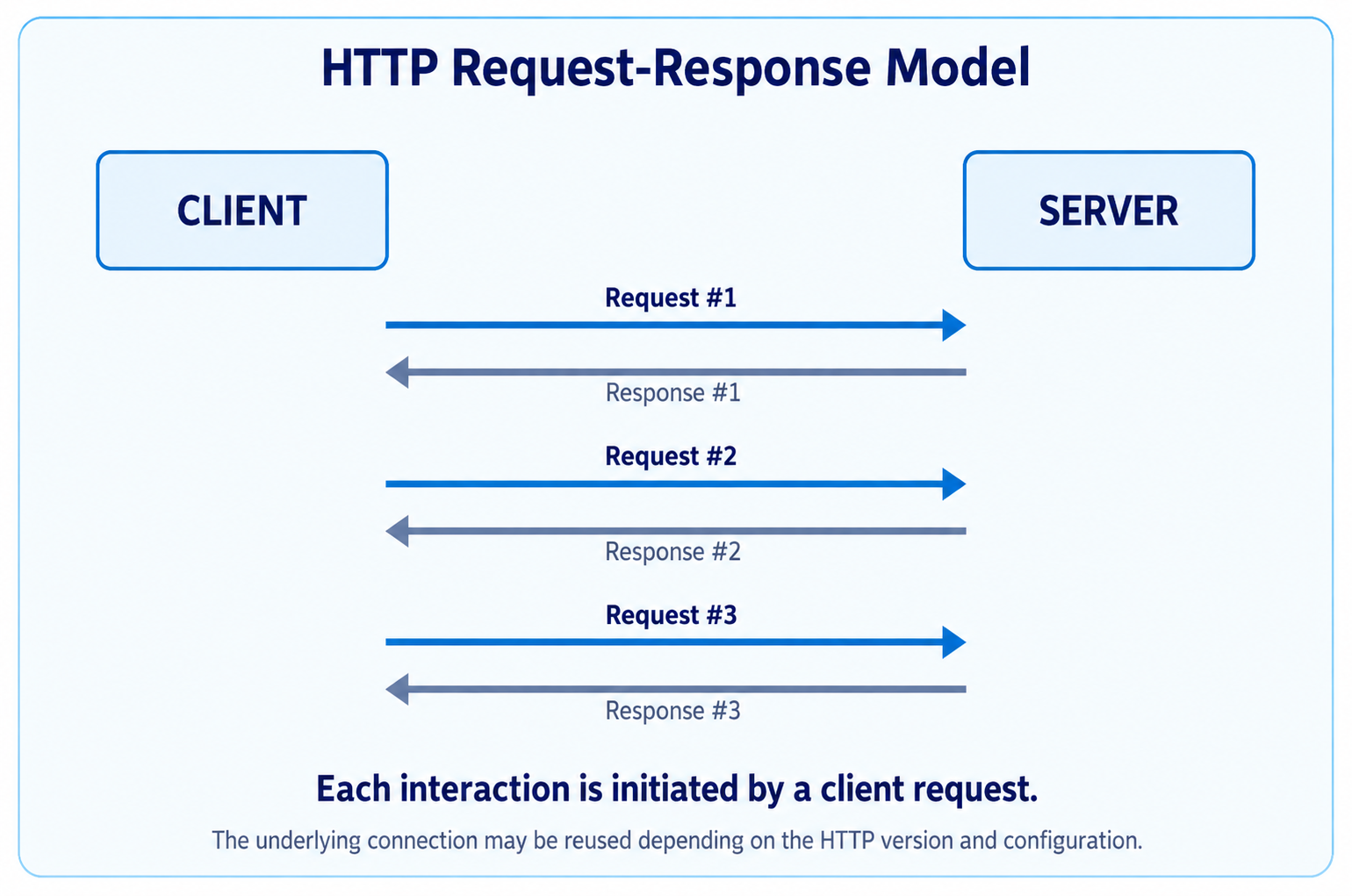
As seen in the above image, in an HTTP-based communication model, each interaction follows a request-response cycle initiated by the client. Depending on the HTTP version and connection configuration, the underlying connection may be reused across multiple requests. However, communication remains primarily request-driven, with the server responding to requests initiated by the client.
WebSocket Model
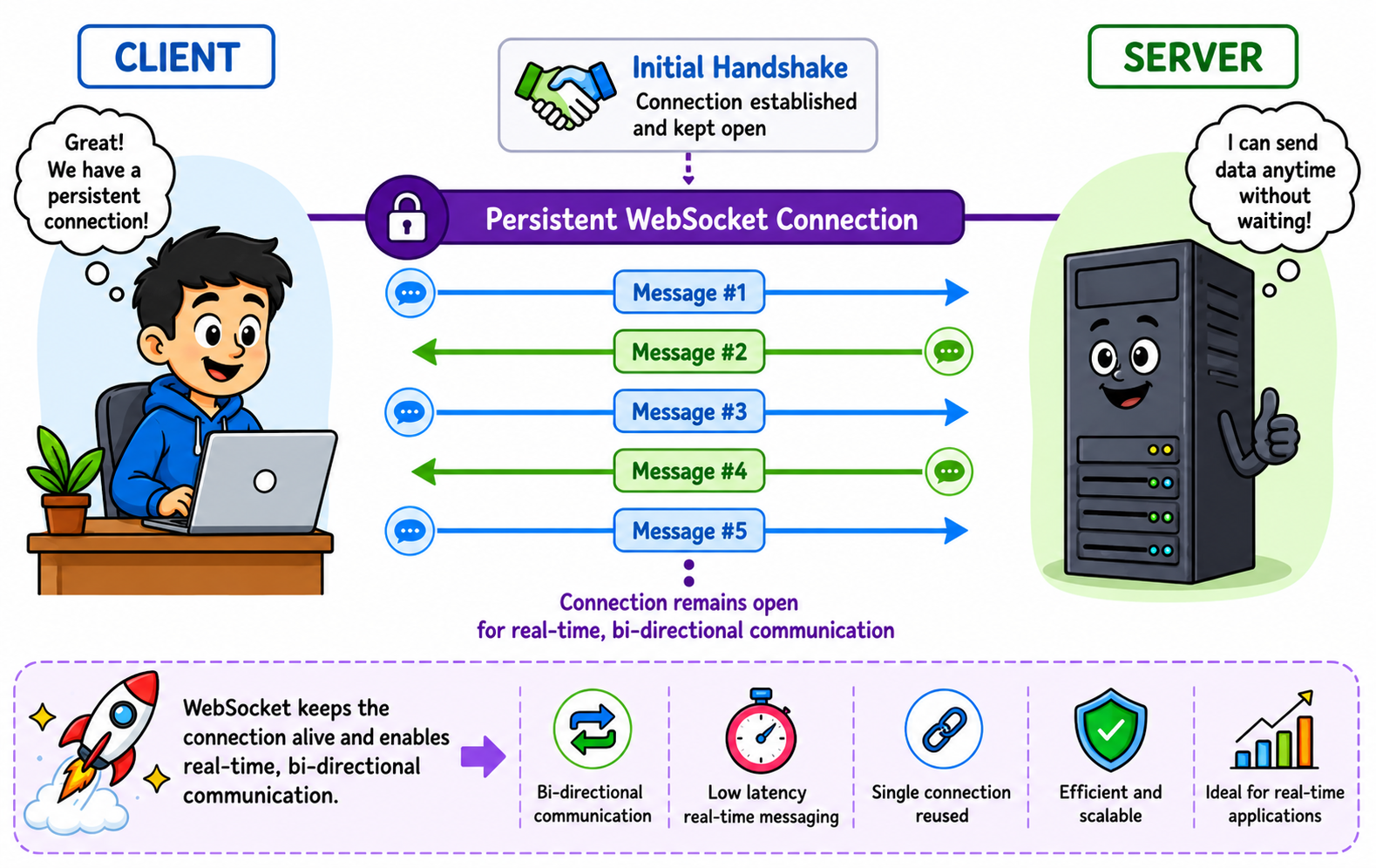
As seen in the above image, WebSocket maintain a persistent, bidirectional communication channel between the client and server. Once the connection is established, either endpoint can exchange messages over the same channel without initiating a new HTTP request-response exchange for each interaction. This approach is well-suited for scenarios requiring timely, bidirectional communication across distributed TallyPrime environments.
Advantages of WebSocket Connectivity
WebSocket address several of the connectivity challenges that arise when TallyPrime is deployed in distributed or customer-managed environments. The key advantages are:
|
Advantage |
What it enables |
|
Persistent connectivity |
Once the Tally Connector establishes a WebSocket connection with the server, the connection remains active for the duration of the session. Requests and responses can therefore be exchanged without establishing a new connection for every transaction. |
|
Low-latency communication |
Since the connection is already established, messages can be exchanged without the overhead of repeatedly creating connections. This helps reduce communication latency, particularly for applications that make frequent requests. |
|
Bidirectional messaging |
Both the application side and the Tally Connector can send messages through the established connection. This allows requests and responses to flow in either direction without relying on separate communication channels. |
|
Reduced connection overhead |
HTTP-based integrations may require repeated request-response exchanges. WebSocket reduce this overhead by maintaining a single connection and reusing it for multiple messages during the session. |
|
Real-time communication |
An active connection allows messages to be exchanged as soon as they are available. This provides a suitable foundation for scenarios where applications need timely responses or continuous communication with TallyPrime. |
|
Outbound connectivity from the customer environment |
The Tally Connector can initiate the WebSocket connection from within the customer environment. This reduces the dependency on exposing TallyPrime through a publicly accessible inbound endpoint and can simplify deployments where NAT or firewall policies restrict inbound connections. |
The primary advantage of WebSocket in this architecture is persistent, outbound-initiated connectivity. Instead of requiring an external application to reach TallyPrime directly, the Tally Connector establishes the communication channel and keeps it available for exchanging requests and responses.
This makes WebSocket particularly relevant for dynamic IP and customer-managed environments, where maintaining a reliable inbound connection to TallyPrime can be difficult.
WebSocket-Based Architecture
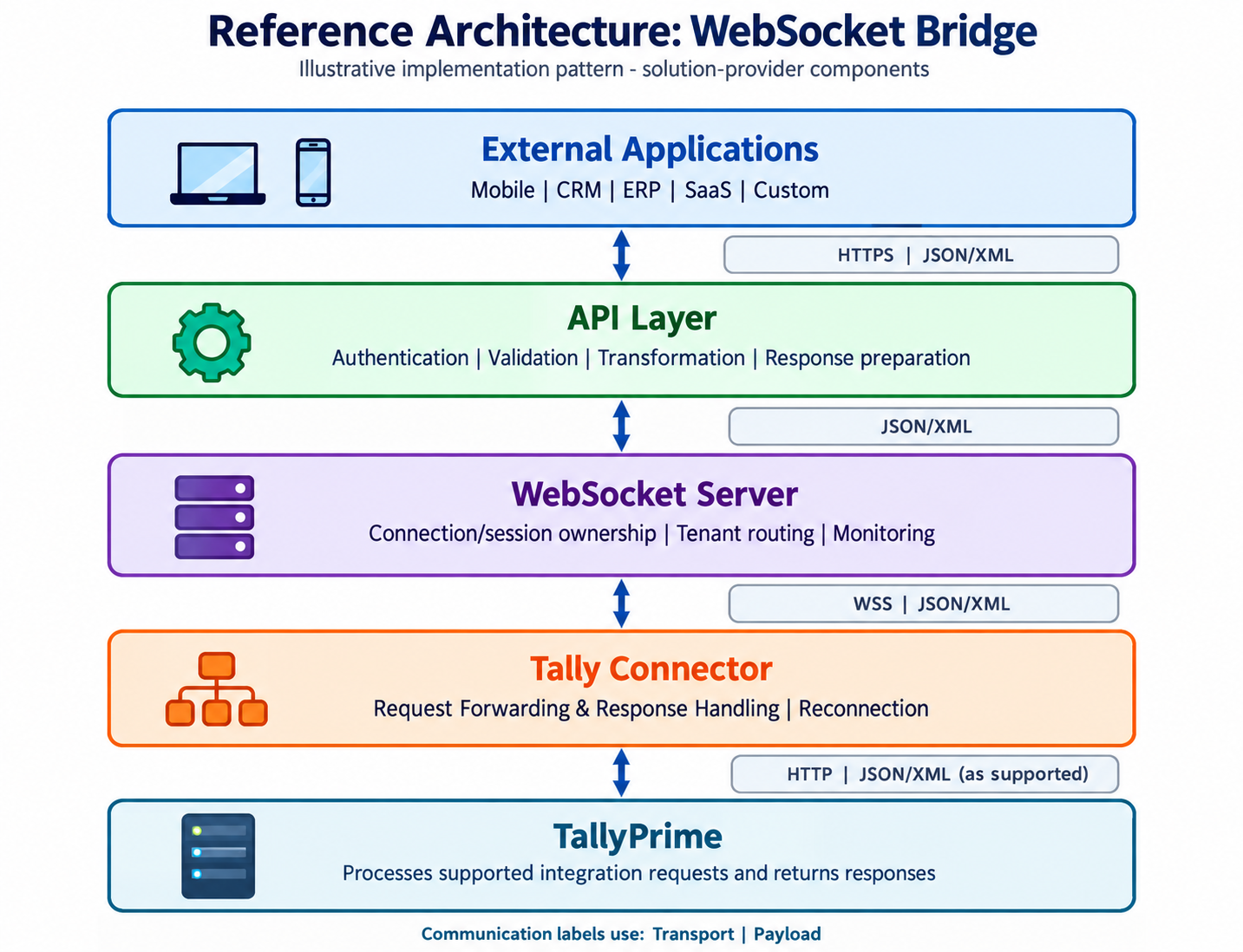
This reference architecture introduces a lightweight connector between TallyPrime and external systems.
Reference Architecture: This illustrates one possible approach for enabling remote connectivity with TallyPrime using WebSocket. The API Layer, WebSocket Server, Tally Connector, authentication mechanisms, hosting infrastructure, and supporting technologies are solution-provider implementation choices and should be designed for the application’s security, scalability, reliability, and deployment requirements.
Architectural Components
The WebSocket-based architecture brings together a set of components, with each component responsible for a specific part of the communication flow. The API Layer handles requests from external applications, the WebSocket Server manages persistent connections and routing, the Tally Connector provides connectivity from the customer environment, and TallyPrime processes the business request.
Together, these components create a communication path between an external application and TallyPrime without requiring the application to establish a direct inbound connection to the customer’s environment.
|
Component |
Role in the Architecture |
Key Responsibilities |
Primary Interfaces |
|
API Layer |
Provides the interface for external applications to submit requests. |
|
Application: |
|
WebSocket Server |
Maintains the persistent communication channel and routes requests to the appropriate customer environment. |
|
Connector: |
|
Tally Connector |
Provides connectivity from the customer environment to the WebSocket Server and TallyPrime. |
|
Server: |
|
TallyPrime |
Processes the integration request and performs the requested business operation. |
|
Connector: |
Request Lifecycle
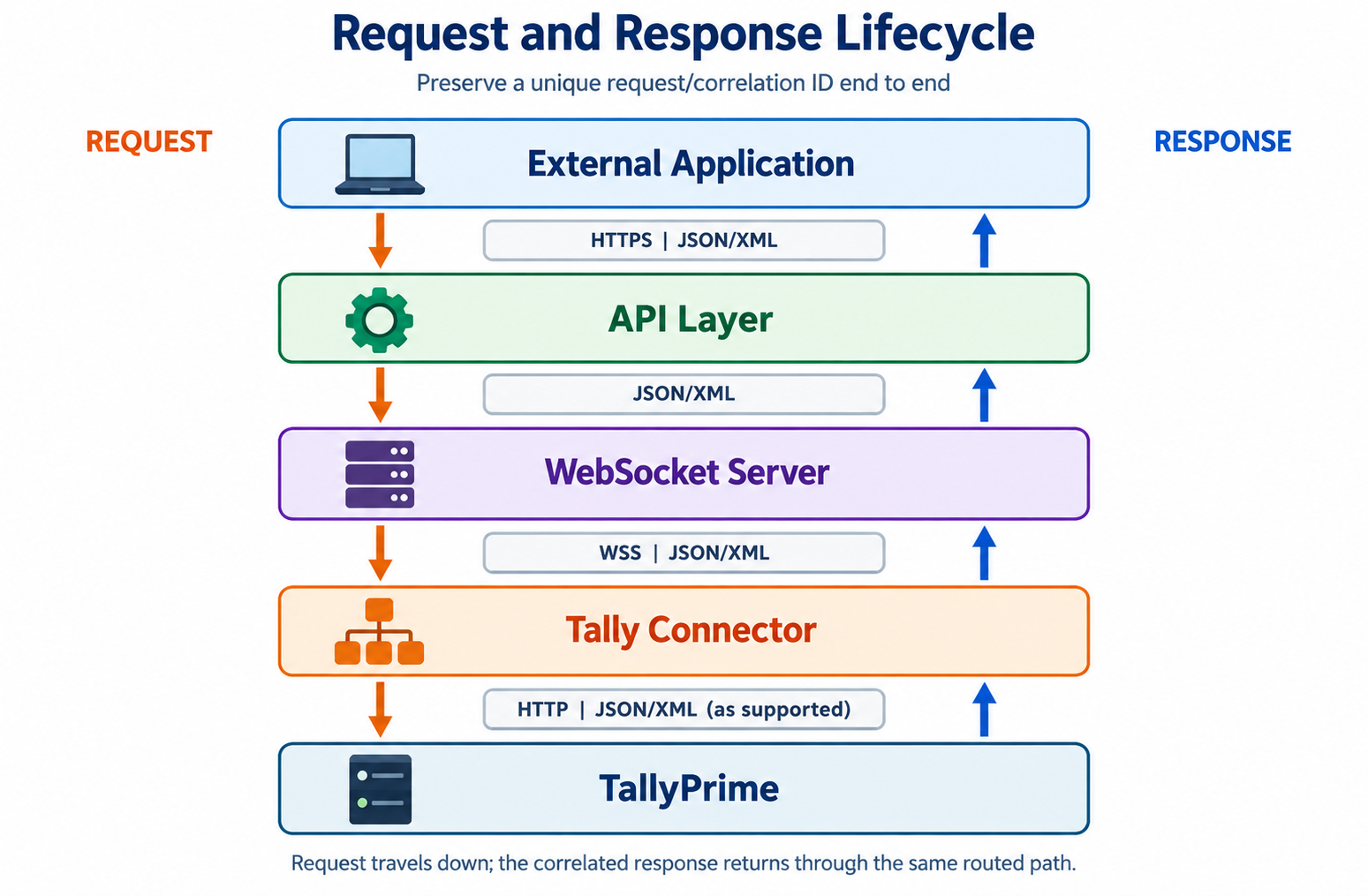
The request lifecycle describes how an application request is processed and routed through the WebSocket-based reference architecture before being executed by TallyPrime. Each component performs a defined role in request handling, connection management, and response delivery.
The following sequence illustrates how a request is processed through the WebSocket-based integration architecture.
Step 1: Application Initiates the Request
The application submits a request to the API Layer in JSON or XML format.
Example JSON Request
{
“tenantId”: “ABC001”,
“action”: “GetLedgers”
}
Step 2: API Layer Processes the Request
The API Layer authenticates the client, validates the request, performs any required business logic, and forwards the request to the WebSocket Server.
Step 3: WebSocket Server Identifies the Target Connector
The WebSocket Server uses the tenant ID to locate the appropriate active Tally Connector session.
Example Tenant Mapping
ABC001 -> Connector A
XYZ001 -> Connector B
The tenant ID is an identifier for routing and isolation; it should not be treated as proof of identity. The server must authenticate the caller and verify that the caller is authorised to access the specified tenant.
Step 4: Request is Forwarded to the Tally Connector
The WebSocket Server transmits the JSON or XML request to the identified Tally Connector through the established WSS connection.
Step 5: Tally Connector Invokes TallyPrime
The Tally Connector forwards the request to the configured TallyPrime HTTP endpoint. Where TallyPrime and the connector run on the same machine, this may use a local endpoint such as:
http://localhost:9000
The payload may be XML or JSON, according to the supported TallyPrime interface and the integration scenario.
Step 6: TallyPrime Processes the Request
TallyPrime validates the request, executes the required business operation, and generates the corresponding response.
Step 7: Response is Returned to the WebSocket Server
The Tally Connector receives the response from TallyPrime and sends the correlated response back to the WebSocket Server through the existing WSS connection.
Step 8: Response is Returned to the Application
The WebSocket Server forwards the response to the API Layer, which formats the response if required and returns it to the calling application.
Reliability and Request Recovery
Each integration request should carry a unique request or correlation identifier for end-to-end tracking. Implementations should define timeout, retry, and duplicate-handling behaviour, particularly for write operations. If connectivity is interrupted while a request is being processed, the integration layer should determine the request status before replaying it wherever possible, helping prevent duplicate business operations.
A connection failure does not necessarily mean that TallyPrime did not receive or process the request. In-flight requests should therefore move to an explicit outcome state, such as completed, failed, timed out, or outcome unknown, before a retry decision is made.
- Timeouts: Define separate connection and request-processing timeouts, and return a clear status to the calling application.
- Retries: Retry only eligible operations, use bounded attempts with backoff, and avoid automatic replay when the outcome of a write request is unknown.
- Duplicate protection and idempotency: Where supported, use idempotency controls or business-level duplicate checks. Do not assume that replaying a TallyPrime write request is inherently idempotent.
- Response correlation: Match every response or error to the original request/correlation ID, including responses received after reconnection.
Multi-Tenant Architecture
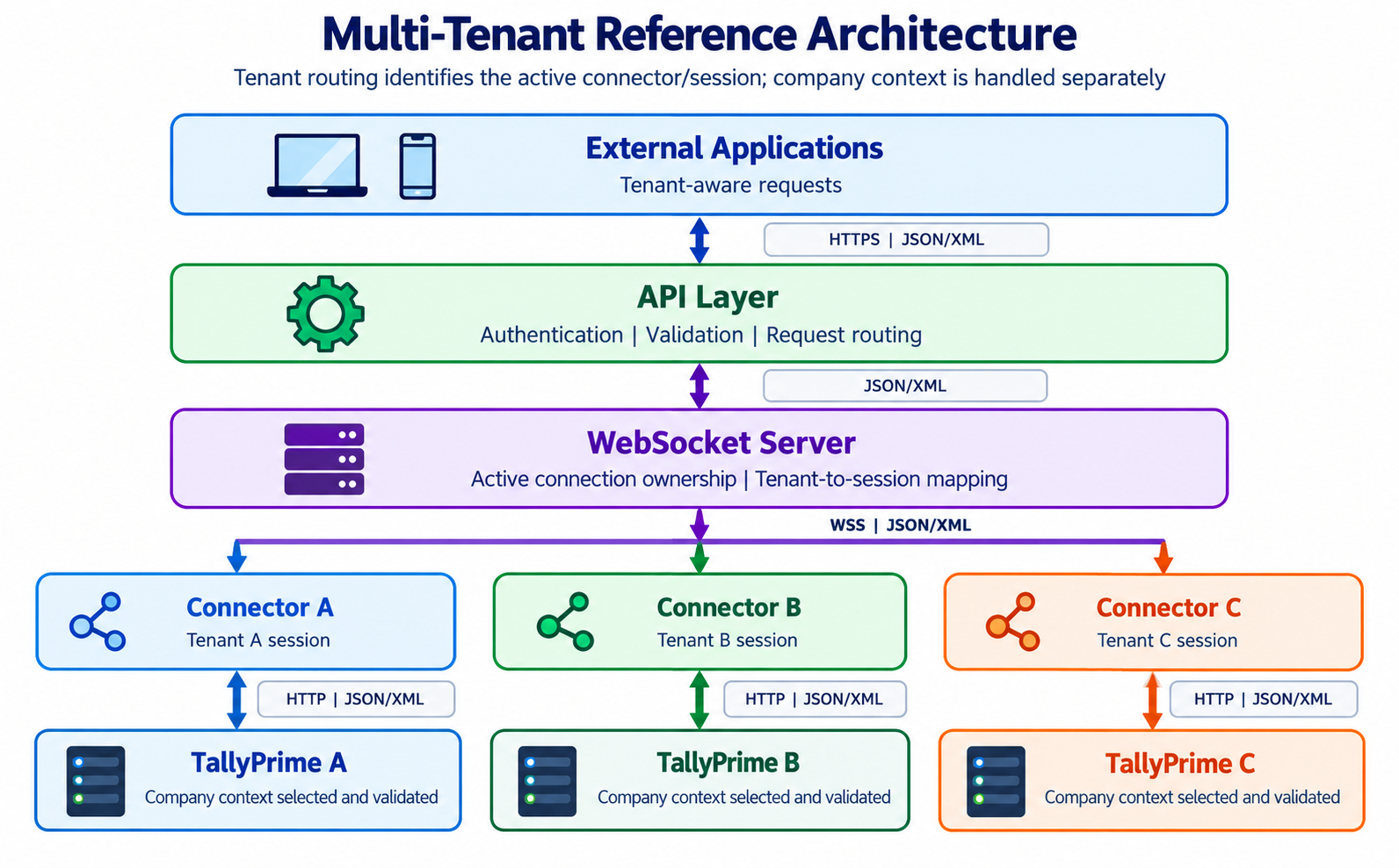
A WebSocket Server implementation can support multiple customer environments by maintaining a distinct active connector/session mapping for each deployed connection. The public request path remains External Application to API Layer to WebSocket Server to the appropriate Tally Connector and TallyPrime environment.
Company Context
A tenant or connector may need to interact with one or more companies available in the associated TallyPrime environment. Tenant-to-connector routing and TallyPrime company selection are therefore separate concerns. The required company context should be identified, authorised, and validated as part of request processing.
Tenant -> Connector/Session -> TallyPrime Instance -> Company Context
Security Considerations
Secure Transport
Secure transport protects the communication between the WebSocket Server and the Tally Connector. Since this channel may carry business data, authentication credentials, and other sensitive information, the connection should use WebSocket Secure (wss://).
wss:// is the secure form of WebSocket communication and uses TLS (Transport Layer Security) to encrypt data exchanged between the connected endpoints. This provides protection against unauthorised access and modification of data while it is in transit.
Choosing the WebSocket Protocol
|
Consideration |
wss:// |
ws:// |
|
Data encryption |
Encrypted using TLS |
No encryption |
|
Protection of sensitive data |
Suitable for business and financial data |
Data may be exposed during transmission |
|
Data integrity |
Protects communication from tampering in transit |
No TLS-based integrity protection |
|
Server authentication |
Supported through TLS certificates |
No TLS-based server authentication |
|
Public or untrusted networks |
Recommended |
Not recommended |
|
Production deployments |
Recommended |
Should be avoided |
|
Enterprise security requirements |
Supports secure deployments |
Provides no encrypted transport |
For production integrations, use wss:// for communication between the WebSocket Server and the Tally Connector.
wss://websocket.example.com
The use of ws:// may be suitable for controlled local development or testing environments where encryption is not required. It should not be used for production communication over public or untrusted networks, particularly when sensitive business data or authentication credentials are involved.
Connector-to-TallyPrime Connectivity
Communication between the Tally Connector and TallyPrime should be configured according to the deployment environment. Where both components run on the same machine, loopback connectivity can be used to keep the communication local. Where they run on different systems, the network path should be appropriately secured and restricted. Endpoint configuration, host access, and data permissions should form part of the solution provider’s security design.
Authentication
Authentication should be designed so that only trusted applications and connectors can establish communication with the WebSocket Server. The following are common mechanisms that may be considered depending on the implementation’s security, deployment, and identity-management requirements.
JWT (JSON Web Tokens)
JWTs are digitally signed tokens that can carry user or application identity claims. They can support stateless validation where a WebSocket connection must be authenticated without relying on application session state. They may be considered for cloud-native and multi-tenant implementations when token issuance, validation, expiry, and revocation are appropriately designed.
API Keys
API keys are credentials issued to applications or connectors for authentication. They may suit controlled integrations, but they should be transmitted over WSS, stored securely, scoped appropriately, rotated, and revocable.
OAuth 2.0 Tokens
OAuth 2.0 provides an authorisation framework for applications to access protected resources on behalf of users or services. It can support delegated access, token expiry, and scoped permissions, and may suit enterprise or identity-provider-based implementations.
Mutual TLS (mTLS)
Mutual TLS authenticates both the client and the server using digital certificates. It can be considered where connector identity requires certificate-based trust, including high-security or regulated environments, subject to appropriate certificate lifecycle management.
The authentication mechanism should be selected based on the solution’s threat model, identity architecture, operational constraints, and compliance requirements. JWT, OAuth 2.0, API keys, and mTLS are implementation choices rather than universal Tally recommendations; whichever mechanism is selected should be validated and protected by encrypted transport and appropriate credential lifecycle controls.
Tenant Isolation
Tenant-isolation controls help keep requests and responses within the authorised application’s corresponding TallyPrime environment. Each Tally Connector can be registered with a unique tenant identifier, allowing the WebSocket Server to identify, authenticate, and route requests to the intended active connector session.
Why is Tenant Isolation Important?
- Helps prevent unauthorised access to another customer’s data.
- Helps route requests only to the intended Tally Connector session.
- Supports appropriate data segregation in multi-tenant deployments.
- Enhances security, privacy, and compliance with enterprise standards.
- Simplifies management of multiple customer connections through unique tenant mappings.
A sound practice is to assign every customer or organisation a unique tenant identifier and validate it for every request. The WebSocket Server should route communication only through authenticated connector sessions associated with the requested tenant, helping maintain appropriate isolation between customer environments.
Request Validation
Request validation helps ensure that only well-formed, authenticated, and authorised requests are processed by the integration platform. Before forwarding a request to the Tally Connector, the API Layer should validate the request payload, verify the tenant identity, and confirm that all mandatory information is present. This helps prevent malformed requests, unauthorised access, and potential security vulnerabilities.
Validate
- JSON Payloads – Verify the structure, schema, mandatory fields, and data types of incoming JSON requests.
- XML Payloads – Validate XML syntax, required elements, and document structure before processing.
- Tenant Identifiers – Ensure the tenant ID is valid, authenticated, and mapped to an active WebSocket session.
The best practice is to perform request validation as early as possible in the request lifecycle. Reject invalid or unauthorised requests with appropriate error responses before they reach the WebSocket Server or TallyPrime, improving security, reliability, and overall system performance.
Rate Limiting
Rate limiting controls the number of requests that a client or connector can send within a specified period. It helps protect the WebSocket infrastructure from excessive traffic, prevents misuse, and ensures fair resource utilisation across all connected tenants, thereby maintaining system stability and consistent performance.
Protect Against
- Abuse – Prevent excessive or malicious requests that could impact normal system operation.
- Denial-of-Service (DoS) Attacks – Limit high-volume traffic intended to overwhelm the WebSocket Server and disrupt service availability.
- Misconfigured Clients – Prevent applications with configuration errors or infinite retry loops from generating excessive requests that consume system resources.
A sound practice is to define request thresholds based on the application’s workload and implement rate limiting at the API Layer and WebSocket Server. When limits are exceeded, reject or throttle requests with appropriate error responses, while logging these events for monitoring and analysis.
Monitoring and Observability
Monitoring and logging provide visibility into the health, performance, and reliability of the WebSocket-based integration. Capturing key operational metrics and events helps identify connectivity issues, diagnose failures, analyse system behaviour, and ensure the platform operates efficiently in production environments.
Capture
- Connection Events – Track connection establishment, disconnections, reconnections, and session lifecycle events.
- Request Identifiers – Assign unique request or correlation IDs to trace requests across the API Layer, WebSocket Server, Tally Connector, and TallyPrime.
- Response Times – Monitor request processing latency and overall response times to identify performance bottlenecks.
- Error Conditions – Log connection failures, authentication errors, validation failures, timeouts, and unexpected exceptions for effective troubleshooting.
The best practice is to implement centralized logging and real-time monitoring with dashboards and alerts. Correlate logs using unique request identifiers to simplify debugging, improve observability, and proactively detect issues before they impact end users.
Example Technology Choices
The choice of WebSocket framework depends on the application architecture, programming language, operational model, and deployment requirements. The following are illustrative examples, not required technologies or an officially prescribed Tally stack. Solution providers may choose equivalent options that fit their environment.
|
Platform |
Technology |
Typical Use Cases |
|
Node.js |
ws |
Lightweight WebSocket servers, prototypes, and custom integration bridges. |
|
Node.js |
Socket.IO |
Event-driven applications requiring automatic reconnection, fallbacks, and additional messaging features. |
|
.NET |
SignalR |
Enterprise applications built on the Microsoft ecosystem with built-in connection management and scalability. |
|
Python |
FastAPI WebSocket |
High-performance Python APIs, microservices, and asynchronous applications. |
|
Java |
Spring WebSocket |
Enterprise-grade Java applications requiring robust messaging and security features. |
|
Go |
Gorilla WebSocket |
High-throughput, low-latency applications requiring efficient WebSocket communication. |
Scalability Considerations
A simple reference implementation may maintain active WebSocket connection metadata in memory, which can suit development and limited-scale deployments. As connected clients and concurrent requests increase, the architecture should be validated and evolved for availability, fault tolerance, capacity, and operational manageability.
The following technologies are illustrative examples of commonly used components. Solution providers may choose equivalent technologies based on their architecture, cloud platform, operational requirements, and existing technology stack.
|
Component |
Example Option |
Purpose |
|
Session Store |
Redis |
Stores shared connection ownership and session metadata across server instances; live WebSocket connections remain with their owning server instance. |
|
Messaging |
Kafka / RabbitMQ |
Enables reliable asynchronous communication and decouples request processing. |
|
Load Balancer |
NGINX |
Distributes incoming connections across multiple WebSocket servers to improve availability and scalability. |
|
Monitoring |
Prometheus |
Collects performance metrics and monitors the health of WebSocket services. |
|
Logging |
ELK Stack (Elasticsearch, Logstash, Kibana) |
Centralizes application logs for analysis, troubleshooting, and auditing. |
|
Deployment |
Kubernetes |
Automates deployment, scaling, and management of containerized WebSocket services. |
Design the API and routing layers to be stateless where practical while externalising the session metadata and messaging needed for active connections. In horizontally scaled deployments, the platform must know which WebSocket Server instance owns each active connector connection. Shared session metadata and/or distributed messaging can route requests to the server instance holding the target connector’s active connection. With appropriate design, testing, and capacity planning, this approach can support increasing numbers of concurrent connector connections while maintaining availability and operational manageability.
Production Readiness Checklist
Before deploying a WebSocket-based integration into a production environment, confirm that the solution incorporates and validates the required security, reliability, and operational controls. The following checklist is a quick reference; actual readiness criteria should reflect the implementation’s risks, workload, and deployment environment.
|
Checklist Item |
Description |
|
WSS Enabled |
Secure all WebSocket communication using TLS (wss://). |
|
Authentication Implemented |
Select and validate authentication appropriate to the security requirements (for example, JWT, OAuth 2.0, API keys, or mTLS). |
|
Tenant Isolation Configured |
Configure controls to route requests only to authorised tenant connections. |
|
Request Validation Enabled |
Validate JSON/XML payloads, tenant identifiers, and request integrity. |
|
Logging Enabled |
Capture connection events, request identifiers, and operational logs. |
|
Monitoring Enabled |
Monitor application health, response times, and WebSocket sessions. |
|
Auto Reconnect Enabled |
Automatically restore WebSocket connections after network interruptions. |
|
Timeout Handling Configured |
Handle connection and request timeouts gracefully to prevent resource exhaustion. |
|
Rate Limiting Enabled |
Protect the infrastructure from abuse, excessive traffic, and denial-of-service attacks. |
|
Backup and Recovery Defined |
Establish backup, failover, and disaster recovery procedures to ensure business continuity. |
|
Request/Correlation IDs Enabled |
Track each request and response end to end using a unique identifier. |
|
Retry and Duplicate Handling Defined |
Define timeout, retry, outcome-unknown, duplicate-protection, and idempotency behaviour, especially for writes. |
|
Company Context Validated |
Identify, authorise, and validate the intended TallyPrime company separately from tenant-to-connector routing. |
|
Connector Endpoint Secured |
Restrict and secure the Connector-to-TallyPrime path according to whether it uses loopback or a trusted network. |
A production deployment should address encrypted connectivity, resilience, observability, capacity, and recovery. Regularly review security policies, monitor system health, and validate operational readiness so that communication between applications and TallyPrime remains dependable across the intended deployment environments.
Bringing It Together
A WebSocket-based architecture can provide an effective approach for enabling remote connectivity with TallyPrime, particularly where direct inbound connectivity is unavailable or impractical. When implemented with appropriate security, request handling, tenant isolation, observability, and scalability controls, it can provide a foundation for dependable integration across diverse deployment environments.
The pattern complements TallyPrime’s integration capabilities by carrying JSON or XML payloads according to the supported interface and scenario. API Explorer can help developers design, test, and validate requests; production deployment still requires solution-specific security, reliability, and performance validation.
By integrating:
- JSON and XML-based communication
- Persistent WebSocket connectivity
- Secure transport using WSS
- Tenant-to-connector/session routing
- Authentication, authorisation, and request validation controls
- Reliability, observability, and scalability controls
With these controls, developers and solution architects can use the reference pattern to design integrations that are suitable for multiple customer environments. The achieved security, scalability, performance, and reliability will depend on the implementation, validation, and ongoing operation of the solution.


