
Print Monthly Statement – ESI in TallyPrime (Payroll)
The ESI Monthly Statement is an MIS report that provides details of the contributions made by employees and the employer towards the ESI account during the specified month.
- Gateway of Tally > Display More Reports > Payroll Reports > Statutory Reports > Employee State Insurance > Monthly Statement.
- Press C (Configure) to specify the print configurations.
- Specify the Period in the respective From and To fields.
- Select the required Employee Category, Employee/Group, Sorting Method, and Display name for Employees, and press Enter.
- Press I (Preview) or P (Print).
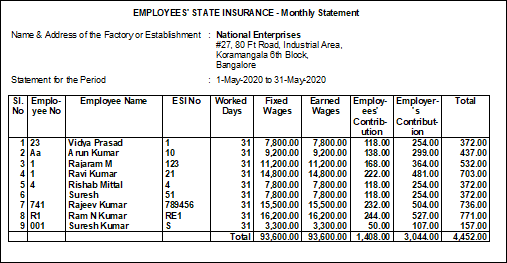
Column Details:
- Employee No: Displays the employee number as entered in the Employee Master.
- Employee Name: Displays the names of employees eligible for ESI.
- ESI No: Displays the unique ESI number allotted to each employee by ESIC, as specified in the Employee Master.
- Worked Days: Displays the total number of days each employee was present during the specified month.
- Fixed Wages: Displays the gross salary considered for ESI calculation for each employee during the specified month.
- Earned Wages: Displays the net salary considered for ESI calculation for each employee during the specified month.
- Employee’s Contribution: Displays the employee’s contribution towards ESI for each employee during the specified month.
- Employer’s Contribution: Displays the employer’s contribution towards ESI for each employee during the specified month.
- Total: Displays the total ESI contribution for each employee during the specified month.
Is this information useful?
YesNo


