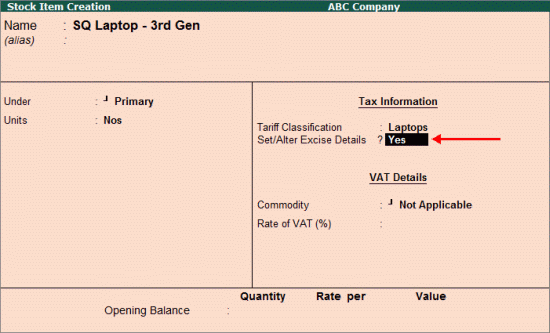
To create a stock item,
Go to Gateway of Tally > Inventory Info. > Stock item > Create
Enter the name of the stock item
Select Primary as the group name from the List of Groups
In the Units option select the unit of measurement (press Alt+C to create, if required)
Select the applicable Tariff Classification
Enable the option Set/Alter Excise Details to provide the excise details
In the Excise Details screen,
The company name gets displayed as the Excise Unit Name
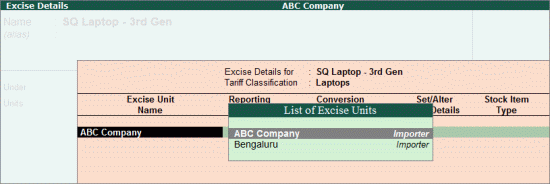
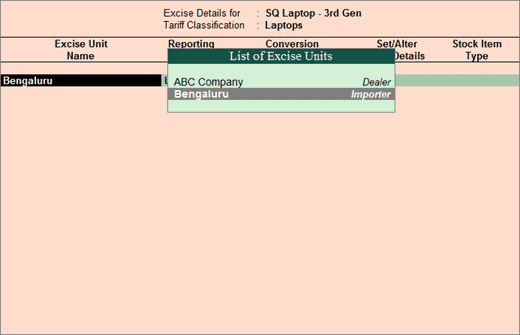
Based on the Excise Unit selected in the Excise Unit Name column, the stock items will appear for selection in invoices created by enabling it for dealer or importer excise. For example, if the stock item is linked to:
Dealer unit, it will be displayed in the excise purchase invoice linked to dealer unit
Importer unit, it will be displayed in the excise purchase invoice linked to importer unit
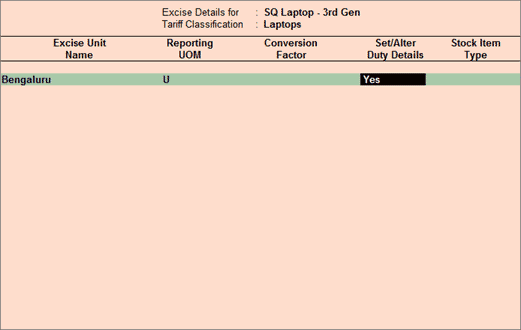
Select the appropriate Reporting UOM as the UOM selected here gets considered while generating reports and e-returns
Enable the option Set/Alter Duty Details
Press Enter to view the Excise Duty Details screen
In Excise Duty Details screen select Ad Valorem as the Valuation Type
Provide the Excise Duty Details as shown below:
Press Enter to accept and the Stock Item Creation screen will appear
Note: In the Excise Duty Details screen, select the Type of Duty and enter the Rate of Duty as applicable to the stock item. The Type of Duty and Rate of Duty provided in the Excise Duty Details screen displayed above is an example and for the purpose of information only.
Press Enter to accept