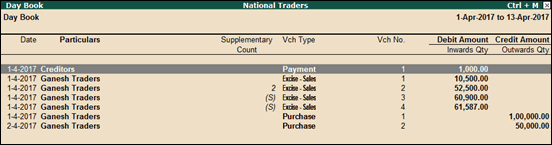
Enabling the option Show Supplementary Details? in the Day Book / Sales Register / Purchase Register will add a separate column Supplementary Count , where all the excise supplementary invoices will be displayed, as shown below:
In the column Supplementary Count , a supplementary invoice is indicated with (S) , and t he original invoice is indicated with a number displaying the number of supplementary invoices recorded against it.
Note : The option Show Supplementary Details? is available when excise for manufacturer is configured in F11: Features > Statutory features .