Accounting or book keeping is an important aspect of running a business successfully. Tally.ERP 9 provides simple-to-use accounting features that enable you to record business transactions easily.
On this page
You can record transactions necessary for your business by creating and maintaining masters, vouchers, and generating reports. Tally.ERP 9 enables you to perform and manage all of the major accounting operations in your business, such as:
● Booking-keeping of all transactions, including creating and maintaining invoices
● Maintaining bill-wise payment information
● Processing transactions for banking, including cheque management and reconciliation
● Managing cost and profit centres
● Implementing statutory and interest calculations
● Viewing Balance Sheet, and profit and loss account
You can get started with Tally.ERP 9's accounting features instantly to:
● Create your company and masters (bank ledgers, party master, cost centre ledgers or employee ledger), as required.
● Configure your company for any statutory or other business requirements.
● Record voucher transaction with entering details of your product or service.
● View reports to know the financial status of your business.
The accounts information lists accounting masters like groups , ledgers and voucher types with which you can provide company's account details. Accounts information provides:
● Single master option to work with one master at a time.
● Multiple masters option to work with many sub-masters at a time. A sub-master behaves exactly like a master.
To view the menu options, go to Gateway of Tally > Accounts Info. Accounts information for ledgers, groups or voucher have the following functions:
|
Function |
Description |
|
Create |
To create new masters. |
|
Display |
To view the m aster information. Master information cannot be modified in the display mode. |
|
Alter |
To view and make changes to the master information. You cannot create masters in the alter mode. |
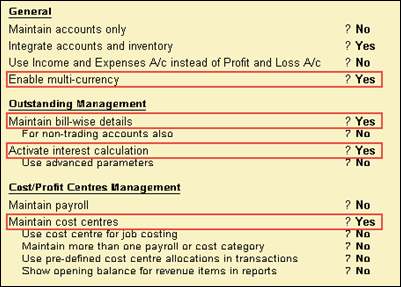
1. Go to Gateway of Tally > F11: Features > F1: Accounts.
2. Select the company from the List of Companies . The Accounting Features screen appears as shown below:
See F11: Company Features in Tally.ERP 9 for details.
● Go to Gateway of Tally > F12: Configure > Accts / Inventory Info. The Master Configuration screen appears as shown below:
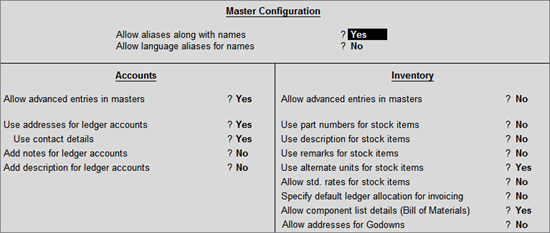
Note: The configurations is applicable for all ledger masters. Changes can be made in the Ledger Configuration screens as well.