You can set the periodicity as monthly/quarterly for e-VAT annexures for Delhi.
To change the periodicity of the e-VAT annexures for Delhi
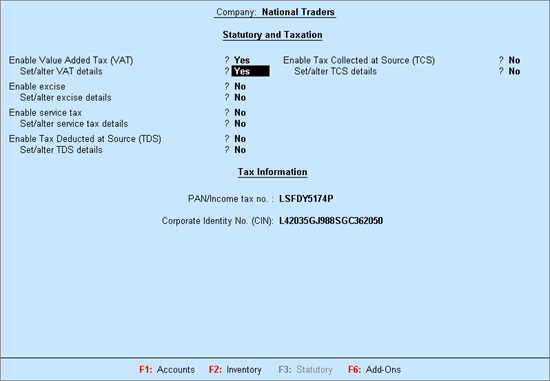
1. Go to Gateway of Tally > F11: Features > Statutory & Taxation. The Company Operations Alteration screen appears as shown below:
2. Set the option Enable Value Added Tax (VAT)? to Yes.
3. Enable the option Set/alter VAT details? to open Company VAT Details.
4. Click F12: Configure to view the configuration screen.
● Set the option Show VAT applicable from to Yes.
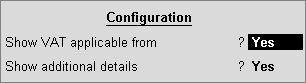
● Press Ctrl+A to save and open the VAT Details screen.
5. Select Monthly in Periodicity of e-VAT Annexures.
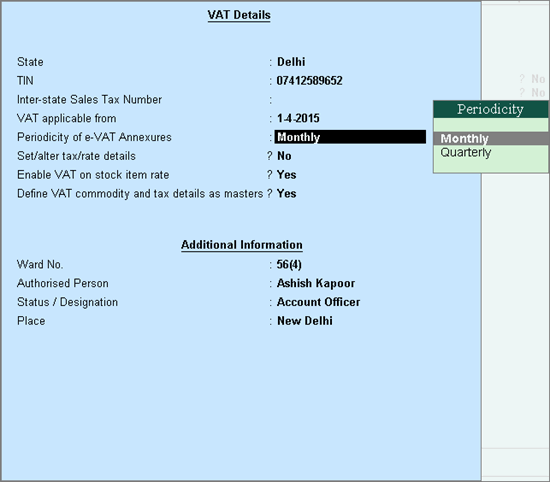
6. Press Ctrl+A to save the VAT Details screen.
7. Press Ctrl+A to save Company Operations Alteration screen.
The annexure report now displays the information for the specified month.
Note: The option selected in Periodicity of e-VAT Annexures (Quarterly to Monthly) will determine the period of the information displayed in the VAT Annexures.