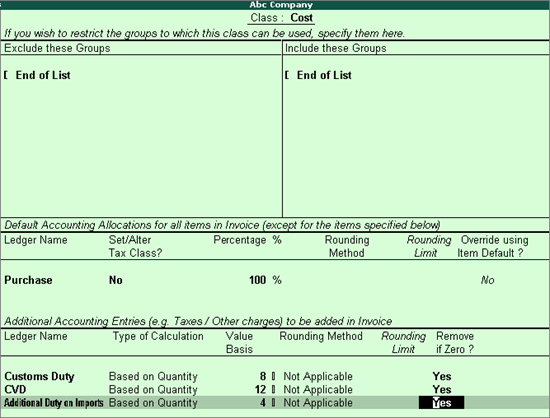
You can create a ledger classification for customer duty applicable for excise for importers. To configure a voucher class, alter the purchase voucher type and make the necessary changes.
To create a classification for ledgers for custom duty
1. Go to Gateway of Tally > Accounts Info. > Voucher Type > Alter.
2. Select Purchase from the List of Voucher Types.
3. Select General and Printing, as required.
4. Enter Name of Class. The Voucher Type Class screen appears.
o Select groups to include or exclude from the class.
o Select the Purchase ledger in the field Ledger Name.
o Select the customs duty ledger in the Ledger Name for Additional Accounting Entries.
o Select Based on Quantity as the Type of Calculation.
o Define Value Basis, Rounding Method, Rounding Limit and Remove if Zero?, as required. The completed screen for Voucher Type Class appears as shown below:
5. Press Enter to save.