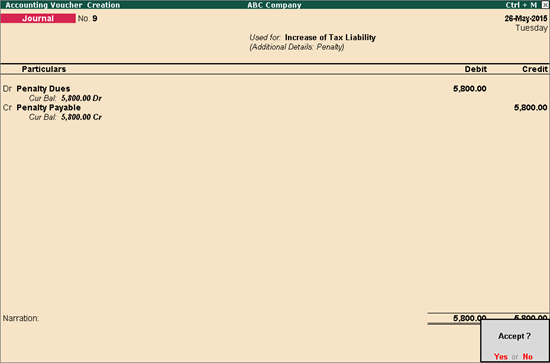
To record journal entry to account for penalty payable
1. Go to Gateway of Tally > Accounting Vouchers > F7: Journal.
2. Click J: Stat Adjustment button. In the Stat Adjustment Details screen:
● Select the option VAT in the Type of Duty/Tax field.
● Select the option Increase of Tax Liability in the Nature of Adjustment field.
● Select Penalty for the option Additional Details.
3. Press Enter to return to voucher.
4. Debit an expense ledger created under Indirect Expenses with option Is VAT/CST Applicable? set to Not Applicable.
5. Credit the ledger created under Current Liabilities. The completed screen appears as shown below:
6. Press Enter to save.