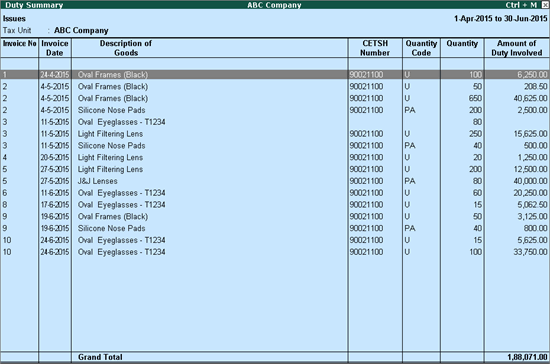
In Duty Summary report, the list of all excise clearances/issues made by raising Rule 11 invoice is displayed. Details of all the items selected in each invoice are displayed irrespective of the duty amount passed on.
The Issues screen of Duty Summary report appears as shown below:
The description on each column of the Issue screen of Duty Summary report is given below:
Invoice No: The invoice number of each excise sales invoice issued on selling excisable goods from dealer unit is displayed here.
Invoice Date: The invoice date of each excise sales invoice issued on selling excisable goods from dealer unit is displayed here.
Description of Goods: The name of each excisable stock item selected in the excise sales invoice is displayed here. Each item appears in a separate row.
CETSH Number: CETSH Number is the acronym for Central Excise Tariff Sub-Heading Number. The CETSH/HSN defined in the item/ledger/stock group/account group/at the company level for stock item displayed in Description of goods column is displayed here.
Quantity Code: The reporting UOM linked to the excisable item captured in Description of Goods column is displayed here.
Quantity: The quantity associated with the excisable item captured in Description of Goods column is displayed here.
Amount of Duty Involved: The excise duty, including cess, calculated for each of the excisable item captured in Description of Goods column is displayed here.
In this report a provision to view the excise receipts linked to excise sales is made available. To view the excise receipts, click F6: Receipt button. The excise receipts linked to the excise sales is displayed in the Receipts screen.
Note: The button F6: Receipts (Issues) is a toggle button used to display Issues with the corresponding Receipts of Duty Summary report.
The Receipts screen of Duty Summary report appears as shown below:
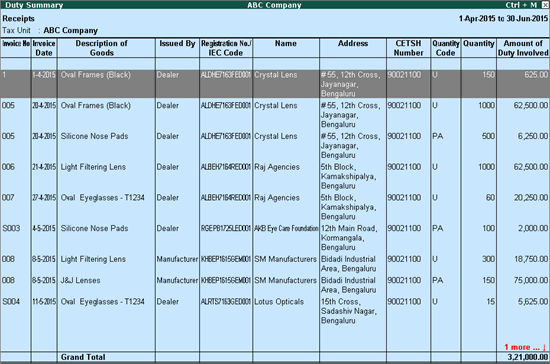
The description on each column of the Receipts screen of Duty Summary report is given below:
Invoice No: The invoice number of each excise purchases linked to each of the excise sales listed in Issues screen is displayed here.
Invoice Date: The invoice date of each excise purchase linked to each of the excise sales listed in Issues screen is displayed here.
Description of Goods: The name of each excisable stock item selected in the excise purchase invoice is displayed here. Each item is displayed in a separate row.
Issued By: The nature of purchase defined for the supplier in the Party Details screen of excise purchase and excise credit note is displayed here.
Registration No./IEC Code: The 15 digit Central Excise registration number defined in the party master from whom excisable goods are purchased is displayed here.
Name: The name of the registered dealer, manufacturer or importer from whom excisable goods are purchased is displayed here.
Address: The address of the registered dealer, manufacturer or importer from whom excisable goods are purchased is displayed here.
CETSH Number: CETSH No. is the acronym of Central Excise Tariff Sub-Heading Number. The CETSH/HSN defined in the tariff master linked to the stock item captured in Description of goods column is displayed here.
Quantity Code:The reporting UOM linked to the excisable item captured in Description of Goods column is displayed here.
Quantity: The quantity associated with the excisable item captured in Description of Goods column is displayed here.
Amount of Duty Involved: The excise duty, including cess, calculated for each of the excisable item captured in Description of Goods column is displayed here.