In Tally.ERP 9, from Release 1.6 user can generate Consolidated E-TDS returns of all member companies of a Group Company.
Currently Tally.ERP 9 supports to generate Consolidated Quarterly E-TDS returns for -
Form 26Q
Form 27Q
To Generate consolidated E-TDS returns from Group Company
In exported E-TDS file it is mandatory to provide company's TDS deductor details like Tax Deduction and Collection Account Number, Name of the person responsible, designation etc.
In Tally.ERP 9 all the TDS Deductor details of the company are updated in F11: Features. In case of consolidated E-TDS returns generated for Group company, TDS deductor details are captured from the Group company (and not form the member companies). To provide the TDS deductor details for a group company, enable TDS and update Company TDS Deductor Details for Group company.
To Enable TDS for Group Company
Go to Gateway of Tally > F11: Features > F3: Statutory & Taxation
Set the option Enable Tax Deducted at Source (TDS) to Yes
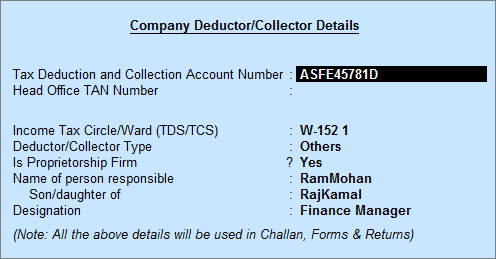
Enable the option Set/Alter TDS Details to Yes and press enter to view TDS Deductor Details screen
In TDS Deductor Details screen enter the details as shown
The Group Company's TDS Deductor Details will be used in consolidated E-TDS returns.
Note: Ensure the E-TDS returns of the individual company is validated separately before generating consolidated e-TDS returns from Group Company.
Load the Group Company and ensure group company is selected
Go to Gateway of Tally > Display > Statutory Reports > TDS Reports > E-TDS Return > E-TDS > Form 26Q
In Exporting eTDS Form press Backspace to make changes in Person Responsible Details or Other Details fields.
By default, the Language and Format is preset as Restricted (ASCII Only) and SDF (Fixed Width) respectively.
In Export Location field enter the details of the path to where the txt file to be exported.
In the Output File Name field specify the file name as Form 26Q.txt
Press Enter to accept the Person Responsible Details (The Address details are automatically defaulted from the Company masters in the Person Responsible Details column)
As per the new E-TDS structure introduced Mobile Number or STD Code with Telephone number have to be provided to generate E-TDS forms. To meet the requirement below fields are introduced
Mobile Number: This field is provided to specify the mobile number of the assessee
STD Code: This field is provided to enter the STD code
Telephone: This field is provided to enter the telephone number of the assessee
Note: As per the new Data Structure either the Mobile Number or STD Code with Telephone number is must be specified in the E-TDS file.
* If the user tries to navigate without specifying the Mobile number or STD Code or Telephone number application will not allow the user to move further.
Select Yes or No as applicable, in Is Change in Address since last Return field.
Under Other Details,
In Category (deductor/Collector) field select the Dedcutor Category. e.g. Association of Person (AOP)
Note: This field is provided as per the new data structure effective from 1-10-2009. Deductor Category details selected here will be captured in the e-Tds file.
Specify the applicable date in the From and To fields
Specify 07-07-2008 in the Challan Date Till field (i.e., Challan date to be considered for TDS payments made for the respective quarter/period)
In Form Name field Tally.ERP 9 by default displays Form 26Q.
Specify the Place and Date of Filing Returns

The exported file is placed in the Tally.ERP 9 Directory with the file name as specified above.
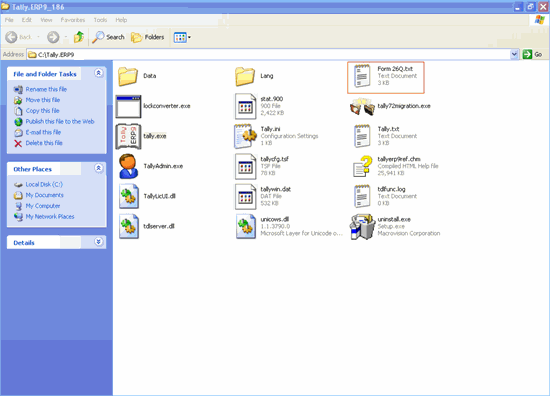
The exported file (form 26Q) is required to be validated with the File Validation Utility (a freely down loadable utility from NSDL website) and after validation, the returns should be submitted to the department in CD along with Form 27A in Physical Form.
Note: It is mandatory to validate the TDS returns with File Validation Utility to confirm to the requirements as prescribed by the Income tax department. In case of any errors in exported file (Returns), the FVU prompts a error message with error code, the assessee may correct the same and revalidate the returns. The File Validation Utility is available for Quarterly and Annual returns separately.
Tally.ERP 9 exports Form 26Q & Form 27Q in the text (.txt) format as prescribed by NSDL.
To validate the e-TDS file generated in New Format use the FVU Version 3.0