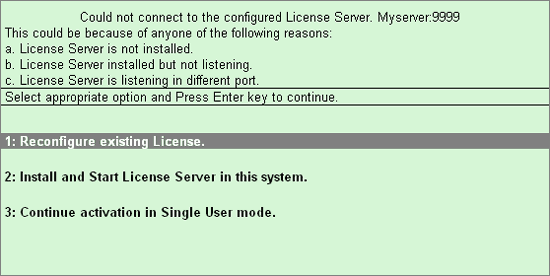
On providing an incorrect name of the Tally License Server or an invalid Port Number or when the license server version is incompatible with the present release/version of Tally.ERP 9 and vice versa. Tally.ERP 9 prompts you for a resolution.
From the License Server resolution screen shown below you can opt to resolve by selecting the required option.
Select this option if you had provided an incorrect License Server name or an invalid port number or the license server version is incompatible.
The Configure Existing License screen appears as shown:
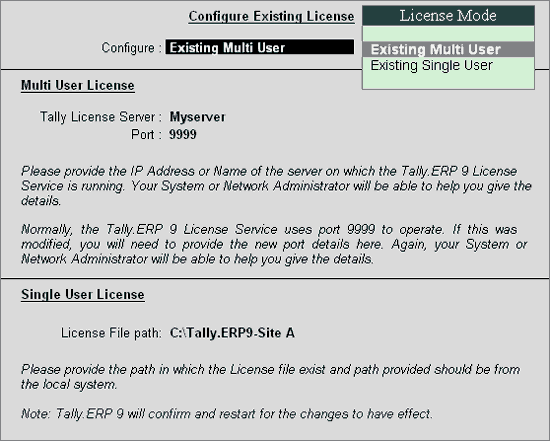
In Configure select Existing Multi User
Provide the required Name/IP Address of the license server in Tally License Server field.
By default, Tally.ERP 9 uses port 9999. In case you want to use another port then provide the required Port Number in Port field.
Click Yes or press Y to save
Select this option to install and start the license server on your computer.
The Install and start License Server screen appears as shown:
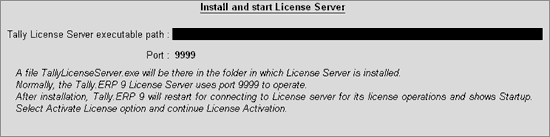
Enter the required path or folder where the license server has to be installed in Tally License Server executable path
By default Tally.ERP 9 uses port 9999 or enter a port of your choice.
Click Yes or press Y to save
Select this option if you want to restart Tally.ERP 9 in single user mode.
The startup screen appears
To know the detailed process to activate a single user license click Activate License.