All Excise Registers available are explained in detail:
Every Registered Dealer has to maintain Stock Register recording the daily receipt and issue of Excisable goods ready for inspection by the officers of the department.
Excise Stock Register is a commodity wise (Stock Item wise) report displaying the details of purchases (Receipts) and sales (Issues) of excisable goods in a given period. It also shows information on the sales transactions, which were sold under Excise Invoice and Commercial Invoice besides capturing details of the Supplier/ Manufacturer.
It clearly comments on the duty (CENVAT) amount passed, duty amount not passed and the balance of duty including Cess amount available during the specified period.
To view Excise Stock Register
Go to Gateway of Tally > Display > Statutory Report > Excise Reports > Dealer > Excise Registers > Excise Stock Register
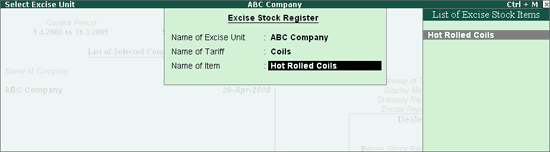
Select the Name of Excise Unit as ABC Company from the List of Excise Unit
In Name of Tariff field select Coils to select the stock item identified with the selected tariff classification
Select the Name of Item from the List of Excise Items to view the report. E.g., Hot Rolled Coils
Note: On selecting Tariff Classification, Tally.ERP 9 displays only those stock items which are grouped under the Tariff Classifications which is selected.
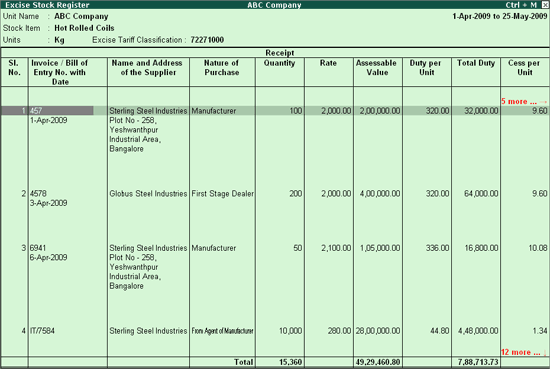
The above screen lists the Purchase details.
Invoice No. /Date: The number given to the Invoice.
Invoice/Bill of Entry No. with Date: This column displays purchase invoice number (in case of domestic purchases) or Bill of Entry No. (in case of imports) along with date.
Name and Address of the Supplier: The field displays the Name and the Address of the Supplier.
Nature of Purchase: Lists the Nature of Purchase as specified during the Invoice Entry.
Quantity: Lists Quantity purchased.
Rate: The Rate at which the item is purchased.
Assessable value: The Total Assessable Value of the product.
Duty per Unit: The Total Duty amount divided by quantity is printed in this field.
Total Duty: The Total Duty for the Stock Item is displayed in this field. This field captures the total Duties paid.
Cess per Unit: Excise Cess per item is displayed.
Total Cess: Total Cess on the total Quantity of the Stock Item.
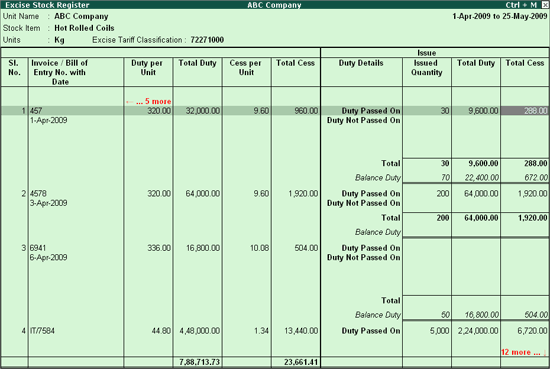
The Issue/Debit Note/Credit Note details in the Excise Stock Register are specified in the screen below.
Duty Details
Duty Passed On/Duty not Passed on: This row displays the details of the Stock Items on which the duty is passed or not passed.
Balance Duty: The Balance available Duty Amount to be passed on is displayed in this field.
Issued Quantity: The Total Quantity of Items Sold/Returned is displayed in this field.
Total Duty: This Field displays the Total Duty utilized in whole or proportionate to the Quantity Issued/Returned.
Total Cess: The Total Cess Amount utilized is displayed in this field.
Detailed Excise Stock Register
Use Alt +F1: Detailed to get a detailed Report. The detailed Excise Stock Register appears as shown below.
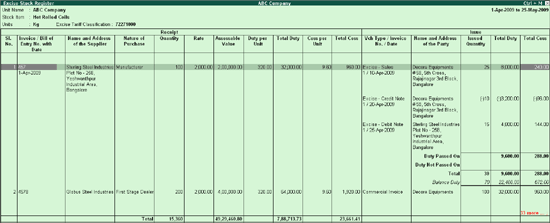
Vch Type/Invoice No./Date/: The Document type, Invoice number and date as specified in the Sales/Credit Note/Debit Note Invoice is displayed in this Column.
Name and Address of the Party: This column displays Name and Address of the Party and Duty Details such as the Duty Passed On, Duty not Passed On and the Balance Duty.
To print the Excise Stock Register
Use the Alt + P key or click on the Print option to print the Report. The printed Excise Stock Register appears as shown below.
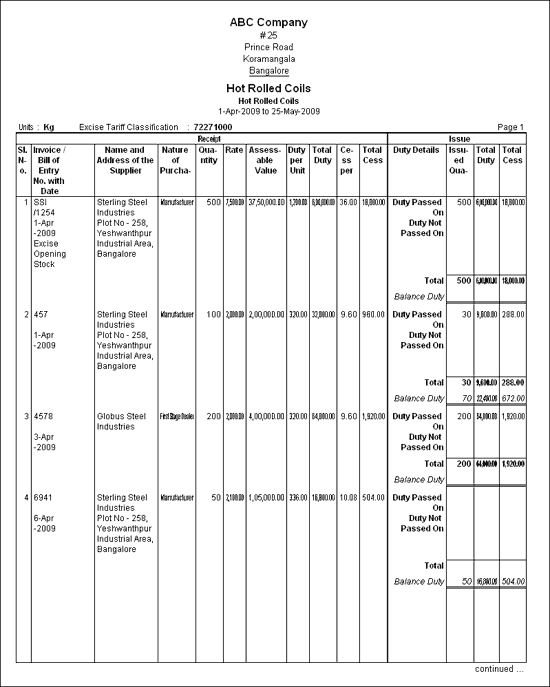
The preview of the Excise Stock Register in Detailed (Alt+F1) mode.
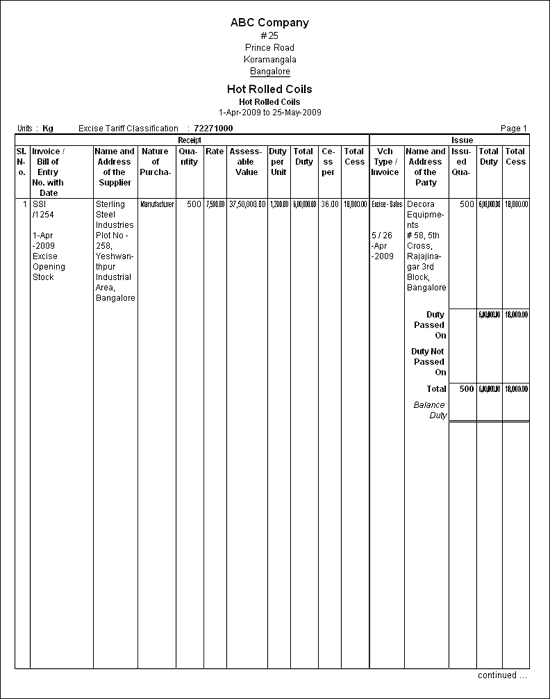
Note: The Excise Stock Register can be printed in Neat Mode format only.
Excise Purchase Bill Register is a Purchase bill-wise report displaying the details of purchases (Receipts) of excisable goods having stock pending for sale. It is Purchase invoice Date wise Report.
To view the Excise Purchase Bill Register
Go to Gateway of Tally > Display > Statutory Report > Excise Reports > Dealer > Excise Registers > Excise Purchase Bill Register
Select the Name of Excise unit as ABC Company
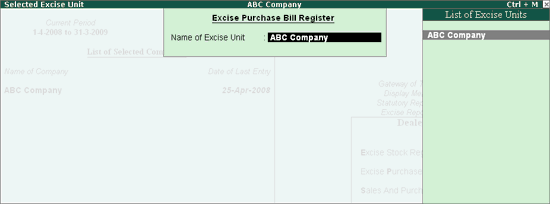
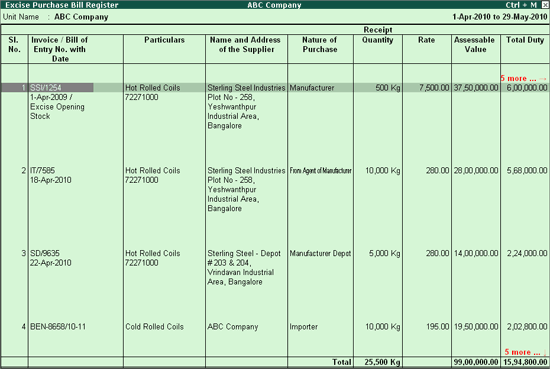
The Excise Purchase Bill Register appears as shown
To view all the Purchase Bills (with pending stock /zero balance) or only Purchase Bills with Zero Stock Balance or Pending Stock, the option Show Purchases of Excise stock for is now provided in F12: Configuration.
By selecting the appropriate option one can configure the Excise Purchase Bill Register.
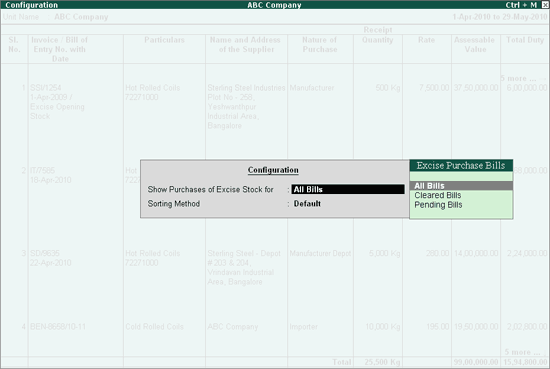
Select the Options -
All Bills: to view all the Purchase Bills (irrespective of Pending stock/zero balance)
Cleared Bills: to view only zero balance (no stock pending for sale) purchase bills.
Pending Bills: to view only purchase bills with stock pending for sale.
The Excise Purchase Bill Register consists of two sections Receipt and Issue.
This section details the Purchase details.
Invoice/ Bill of Entry No with Date: This column displays Purchase Invoice number (incase of domestic Purchase) / Bill of Entry number (in case of Imports) and Date.
Particulars: This column displays the Stock Item purchased with Tariff Number.
Name and Address of the Supplier: This column displays the Name and the Address of the Supplier.
Nature of Purchase: This column lists the Nature of Purchase as specified during the Invoice Entry.
Quantity: This column displays the Quantity purchased.
Rate: This Column displays the Rate at which the item is purchased.
Assessable Value: The Total Assessable Value of the item appears in this column.
Total Duty: The Total Duty for the Stock item is displayed in this column.
Total Cess: The Total Cess Amount calculated on the purchased quantity is displayed in this column.
This section displays the Sales/Credit Note/Debit Note details.
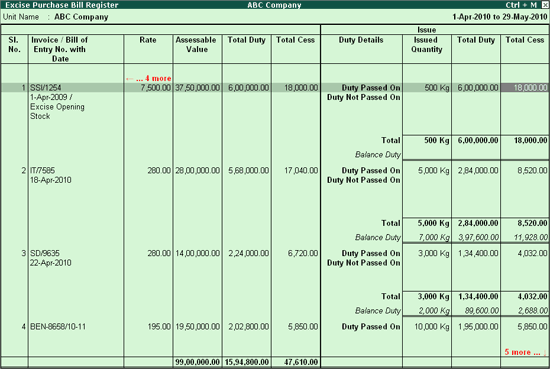
Duty Details: This Column displays the details of Duty Passed On, Duty Not Passed On and Balance Duty on the Quantity sold.
Issued Quantity: The Total Quantity of Items Sold/Returned is displayed in this column.
Total Duty: This column displays the Total Duty Utilized in whole or proportionate to the quantity Issued/Returned.
Total Cess: The Total Cess Amount utilized on the Stock items Issued/Returned
Note: Use ALT+F1 to view the Excise Purchase Bill Register in Detailed mode.
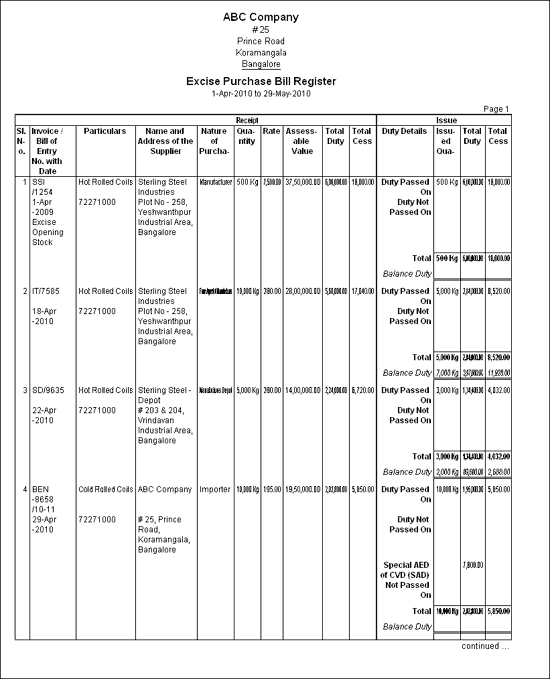
The preview of the Excise Purchase Bill Register appears as shown when the register is configured to view All Bills
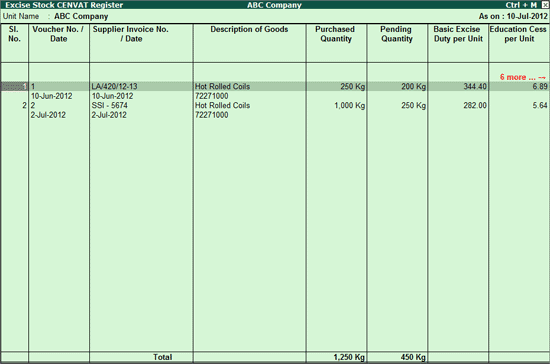
Excise Stock CENVAT Register displays the CENVAT details of Goods Purchased. Using this report Excise Dealer can ascertain the pending quantity and CENVAT duty per unit which he can pass on to the subsequent buyers.
To view Excise Stock CENVAT Register,
Go to Gateway of Tally > Display > Statutory Reports > Excise Reports > Dealer > Excise Registers > Excise Stock CENVAT Register
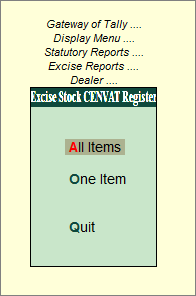
Excise Stock CENVAT Register can be viewed for All Items or One Item.
To view Excise Stock CENVAT Register for All Items
Go to Gateway of Tally > Display > Statutory Reports > Excise Reports > Dealer > Excise Stock CENVAT Register > All Items
In Select Excise Unit screen
In Name of Excise Unit field select the Excise unit from the List of Excise Units
The Excise Stock CENVAT Register appears as shown:
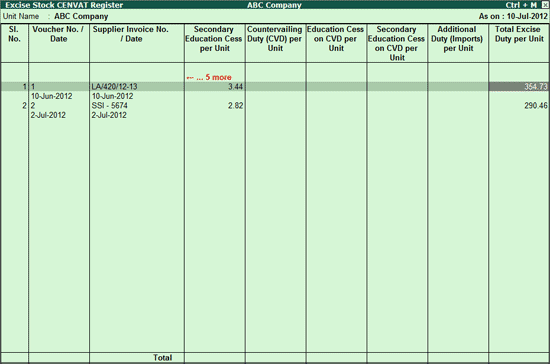
To view Excise Stock CENVAT Register for All Items
Go to Gateway of Tally > Display > Statutory Reports > Excise Reports > Dealer > Excise Stock CENVAT Register > One Item
In Select Excise Unit screen
In Name of Tariff field select the Tariff Classification from the List of Tariff Classifications.
In Name of Item field select the stock item.
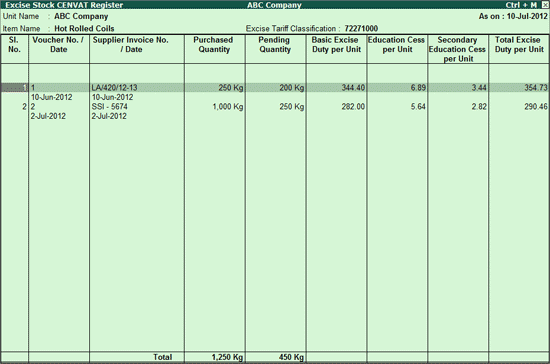
The Excise Stock CENVAT Register appears as shown:
To configure Excise Stock CENVAT Register - All Items\ One Item report press F12 key or click on F12: Configure button
The Configuration screen appears as shown:
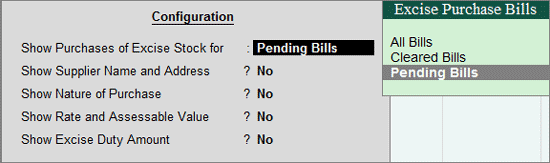
Show Purchases of Excise Stock for: Select the required type of Purchase bills - All Bills, Cleared bills & Pending Bills. According to the option selected, the Excise Stock CENVAT Register will capture the Excise Purchase Bills with the respective details.
Show Supplier Name and Address: Set this option to Yes to view Name & Address of the Supplier. By default this option is set to No.
Show Nature of Purchase: Set this option to Yes to view the Nature of Purchase, like Manufacturer, First Stage Dealer etc.
Show Rate and Assessable Value: Set this option to Yes to view Rate & Assessable Value of the Excise Stock.
Show Excise Duty Amount: Set this option to Yes to view the Total excise duty paid on the excise stock. By default the report will display ‘Duty per Unit'.
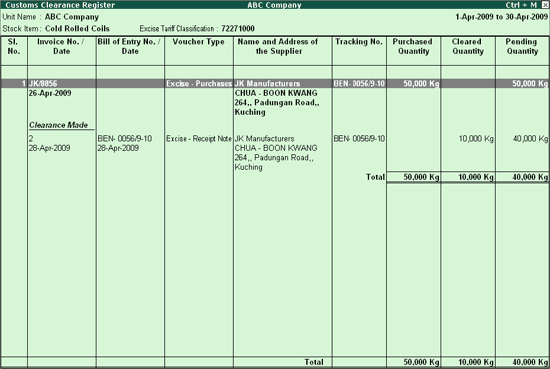
Customs Clearance Register is a import bill-wise report displaying the details of imports of Excisable goods having stock pending for Clearance. It is Purchase invoice Date-wise Report.
This report captures the information of goods Imported, Cleared from customs warehouse and stock Pending for clearance.
To view Customs Clearance Register
Go to Gateway of Tally > Display > Statutory Reports > Excise Reports > Dealer > Excise Registers > Customs Clearance Register
You can view Customs Clearance Register for All Items or One Item, as required.
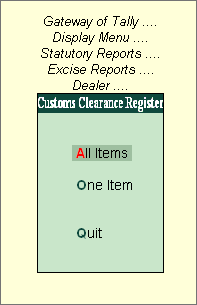
To view Customs Clearance Register for all items select All Items and press enter to view Select Excise Unit screen
In Select Excise Unit screen
Select ABC Company in Name of Excise Unit field
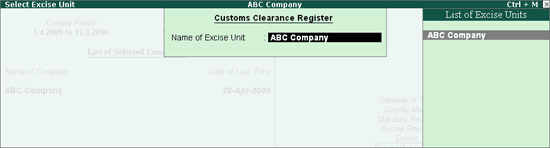
The Customs Clearance Register appears as shown
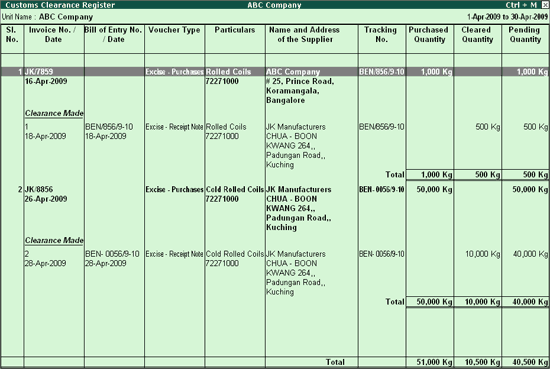
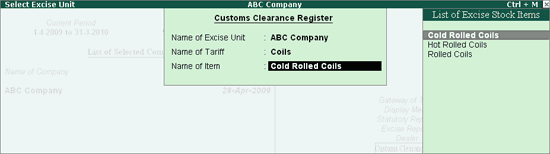
To view Customs Clearance Register for one items select One Items and press enter to view Select Excise Unit screen
In Select Excise Unit screen
Select ABC Company in Name of Excise Unit field
In Name of Tariff field select the tariff classification of the stock item for which the report to be viewed. Select Coils
In Name of Item field select Cold Rolled Coils
The Customs Clearance Register appears as shown