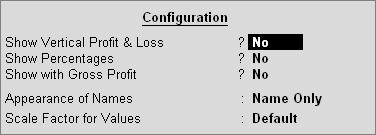
To configure Profit Loss Account, Press F12: Configure
The Profit and Loss Account will be displayed in the Horizontal (default) form if you set the option Show Vertical Profit & Loss? to No.
Set the option to Yes to display Profit & Loss Account in the Vertical form.
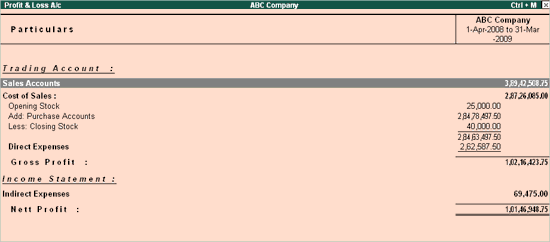
The Vertical Form shows the Trading Account and the Income Statements separately.
Each line is expressed as a percentage of Sales Accounts, i.e., if you consider Sales Accounts to be 100%, the rest of the lines would be a percentage of Sales Accounts.
If the option Show With Gross Profit? is set to Yes, the Profit & Loss Statement is split to show Trading Profit, which considers only the Cost of Sales and Direct Expenses. Indirect Expenses are deducted from the Gross Profit to show the Nett Profit.
Note: This field is applicable only to Horizontal Form of Profit and Loss Account.
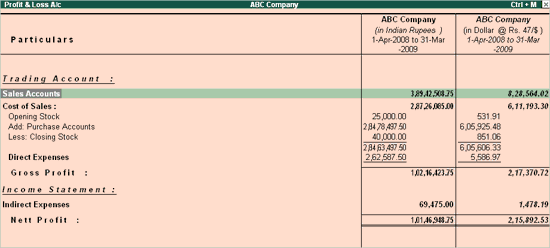
Select a column to display the Profit & Loss Account in a different currency.
Press New Column on the button bar or the keys ALT+C, change only the Currency and give the closing Exchange Rate.
The Profit & Loss Account figures are converted at this rate.
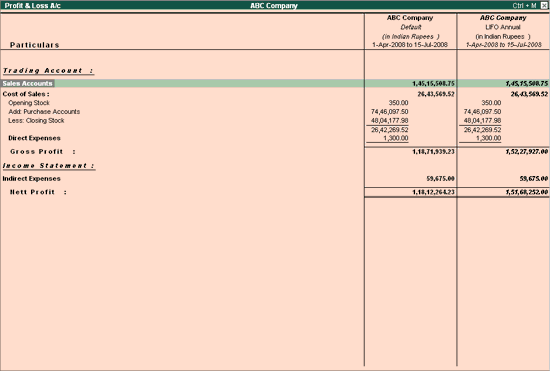
Select a column to display the Profit & Loss Account with a different stock valuation method.
Press New Column on the button bar or the keys ALT+C and change only the Stock Valuation Method to LIFO Annual.
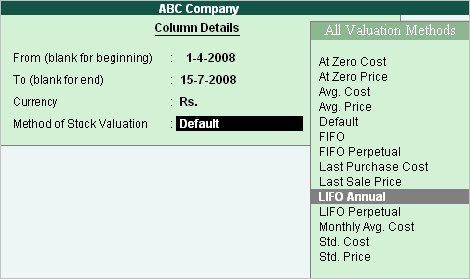
The Profit and Loss screen will be displayed as shown.
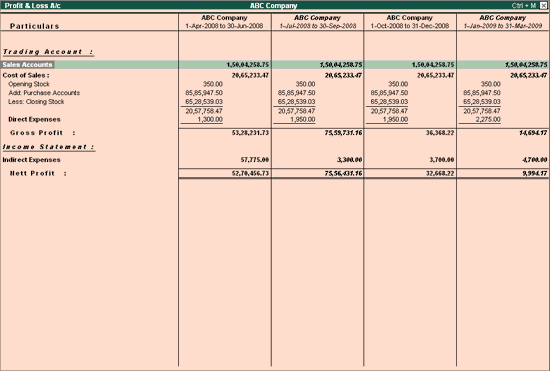
Press Auto Column on the button bar or the keys ALT+N.
Select Quarterly from the list of periods.
The Profit and Loss screen will be displayed as shown: